๐Free NFPA 101 Life Safety Code Compliant Generator
Transform Your Hand Sketch Into an NFPA-Compliant Evacuation Map
๐ฅJoin 7,500+ businesses already compliant
Upload your hand-drawn floor plan and get an evacuation map that meets NFPA 101 Life Safety Code requirements. Proper egress paths, exit access, and discharge points included.
NFPA101 Compliant
100%Fire Marshal Ready
1 FreeFile + 5 Regen
Life Safety Code-aligned draft. Fire-marshal review-ready format (human review required before posting).
โญTrusted by businesses of all sizes
๐บ๐ธUsed in all 50 States
๐บ๏ธOver 15,000 evacuation maps generated
๐Built on secure, encrypted infrastructure256-bit SSL
โ OSHA-aligned US standards29 CFR 1910.38
๐Top Converting Industries
Professional Maps for Every Industry
Our AI creates OSHA-aligned maps tailored to your specific industry requirements
๐ Click to enlarge
๐ณ Restaurant & Food Service
Restaurant Evacuation Map
Kitchen hood suppression, grease fire routes, and customer/employee exits clearly marked
โ Hood Suppression Systemโ Class K Extinguishersโ Dual Exit Routesโ Customer Flow Paths
94%Compliance Rate
~30sGeneration Time
Free preview โข OSHA-aligned โข Print-ready in 30 seconds
NFPA-Compliant Evacuation Map Generator
Upload your hand sketch. Get an NFPA 101 Life Safety Code compliant map instantly.
๐ค
Upload
โก
Generate
โ
Download
๐ 5 Free Maps Left
Create Your NFPA Evacuation Evacuation Map
โ๏ธ
High ContrastUse dark ink on white paper. Bold lines help our AI detect walls accurately
๐
Top-Down AnglePhotograph from directly above โ tilted angles distort the geometry
๐ท๏ธ
Label RoomsWrite "Exit", "Storage", "Breakroom" etc. โ our AI reads your labels for compliance
๐
Full Floor PlanCapture the entire layout including all walls, doors, and exits โ no cropping
๐ช
Mark ExitsCircle or label exit doors with a red dot or "EXIT" text for best detection
๐ก
Good LightingAvoid shadows and glare โ even lighting produces the sharpest results
๐
Drag & drop your floor plan here
or
PNG, JPG, HEIC, TIFF, BMP, PDF - Hand-drawn sketches work too!
or
No floor plan handy? Generate an instant demo map โ no upload needed.
Edit your map for free. Move, resize, and recolor every exit sign, route, and icon. Create a free account to save and download in HD. No credit card required.FREE
๐Your files are private: never shared, stored temporarily, deleted automatically.
Compliance Options
๐ฅ NEWโจ
Customize Your Map
Add special requests for your safety map - tell our AI exactly what you need!
๐ฏAdd specific details like "Mark fire extinguisher near kitchen"
๐Request specific zones: "Highlight assembly point in parking lot"
๐ฅAdd safety equipment: "Include AED location near reception"
0/2000
Quick Add:
Frequently Asked Questions
Is this evacuation map generator really free?
Yes โ you can generate your first OSHA-aligned evacuation map draft completely free. Just upload a floor plan and our AI drafts a professional map in about 30 seconds. No credit card required.
Are the generated maps aligned with OSHA?
Our AI drafts maps that follow OSHA 29 CFR 1910.36โ37 and NFPA 101 Life Safety Code standards. Every map includes clearly marked exits, fire extinguisher locations, assembly points, and directional evacuation arrows. Supervisor review is required before posting to your facility.
What file formats can I upload?
We accept JPG, PNG, and PDF floor plans. For best results, use a clear, high-resolution image of your floor plan with visible walls, doors, and rooms.
How long does map generation take?
Most maps are generated in 20โ40 seconds. Complex multi-floor plans may take slightly longer. You can download your map immediately after generation.
Can I edit the map after generation?
The generated map is a high-resolution image you can download and print. For custom edits or enterprise features like multi-floor support and branded maps, check our pricing plans.
Is my floor plan data secure?
Yes. All uploads are encrypted in transit (TLS 1.3) and processed in secure cloud environments. We do not share your floor plans with third parties.
From Napkin Sketch to Professional Evacuation Map
Transform your hand-drawn floor plans into OSHA-aligned safety maps in seconds
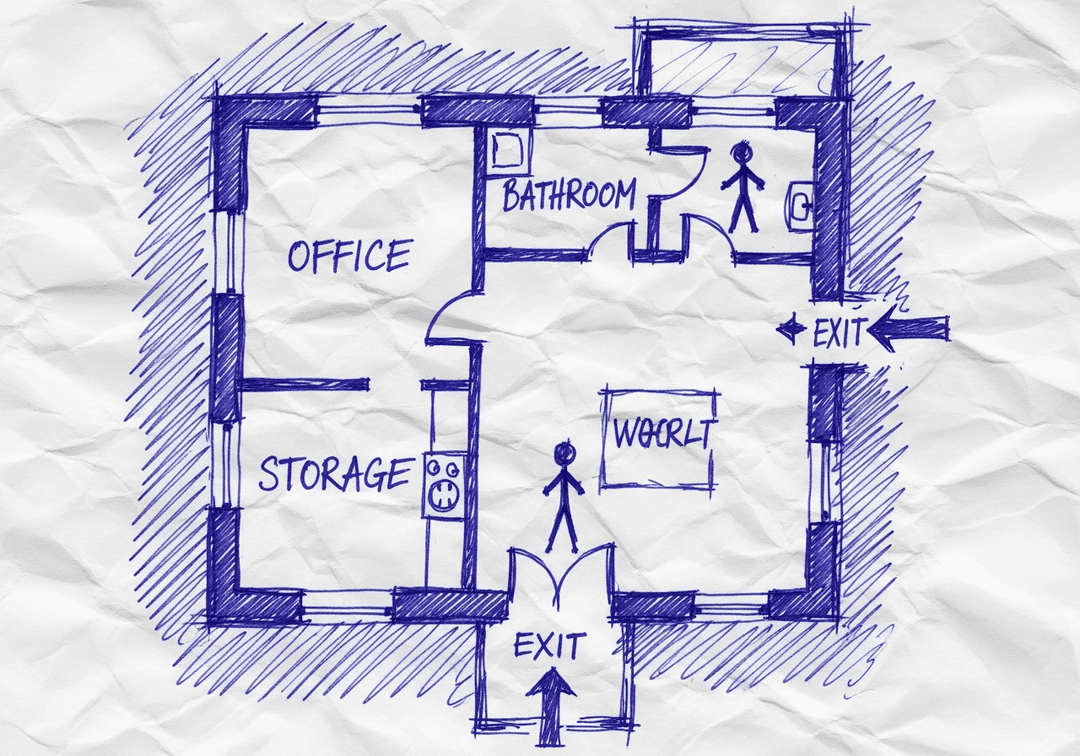
โ๏ธYour Sketch
Hand-drawn on paper
Rough layout
Basic room labels
โกAI Magic~30 seconds
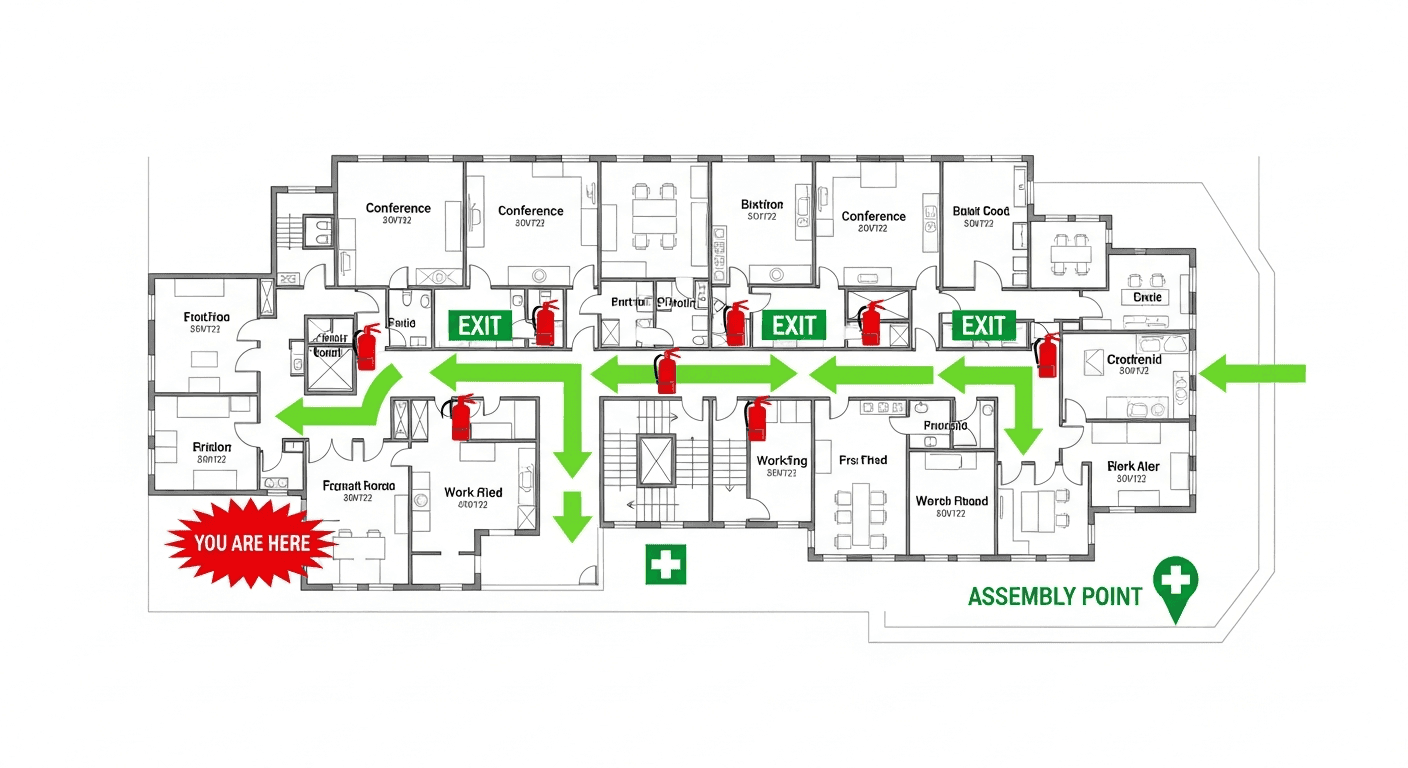
โ Professional Result
๐งฏ Fire Extinguishers
๐ช EXIT Signs
โก๏ธ Evacuation Routes
๐ YOU ARE HERE
๐ฅ Assembly Point
๐ฅ First Aid
Works with photos, scans, PDFs, CAD files, or even hand-drawn napkin sketches
โ OSHA/NFPA-Aligned Draft
โ Instant Results (~30 sec)
โ Print-Ready (11x8.5" or 17x11")
Transform Any Sketch Into a Professional Map
Do I need design skills to create an evacuation map?
No design skills are required. Our AI understands hand-drawn floor plans, smartphone photos, scanned blueprints, and PDF documents. Simply upload any representation of your facility layout and receive a professional-grade emergency evacuation map instantly.
Are the generated maps OSHA-aligned?
OSHAMap is designed to help users organize key evacuation-planning information commonly associated with OSHA 29 CFR 1910.38 โ clearly marked exit routes, fire extinguisher locations within 75-foot travel distance, assembly points, YOU ARE HERE markers, and accessibility accommodations per ADA guidelines. Each draft must be reviewed and verified for the actual workplace by the employer, safety officer, or AHJ before posting.
Can I update my evacuation map after renovations?
Yes, unlimited revisions are included. If you renovate your office or add a new emergency exit, simply re-upload your updated floor plan and generate a new compliant map instantly. All free maps include unlimited regeneration so you always have current evacuation documentation.
What types of buildings can use this evacuation map generator?
Our generator works for any building type including warehouses, manufacturing plants, healthcare facilities, schools, retail stores, and office buildings. The AI adapts to any facility size and layout, generating appropriate exit routes, fire safety equipment placement, and assembly point locations.
๐ก๏ธ
NFPA 101 Life Safety Code Compliant
Every evacuation map follows NFPA 101, NFPA 1, and NFPA 170 standards for proper egress, exit marking, and fire safety symbols
โNFPA 101
โNFPA 1
From Hand Sketch to NFPA-Compliant Map
Our AI applies Life Safety Code requirements automatically
โ๏ธ
Your Hand Sketch
Draw on paper, napkin, or whiteboard
NFPAโก
~60 seconds
๐
NFPA-Compliant Map
Fire marshal ready
โจFrom Napkin Sketch to Professional Map
Find the Right Tool for Your Needs
Choose the perfect sketch-to-map converter for your specific requirements
Built-in Life Safety Code requirements for every map
๐
NFPA 101-Aligned
Full Life Safety Code compliant design with proper egress components
๐ช
Exit Designation
Proper exit access, exit, and exit discharge designation per code
๐
Travel Distance
Automatic travel distance calculations per NFPA requirements
๐ค๏ธ
Egress Limits
Common path of egress travel limits enforced automatically
๐ซ
Dead-End Detection
Dead-end corridor limits automatically checked and flagged
How It Works
4 simple steps to your NFPA-compliant evacuation map
1
Sketch Your Floor Plan
Draw your floor layout on any paper showing walls, doors, and rooms. Include major structural elements for accurate egress planning.
2
Upload Your Sketch
Take a photo or scan your sketch and upload it. Select your occupancy type for proper NFPA code application.
3
AI Creates NFPA-Compliant Map
Our AI analyzes your layout against NFPA 101 requirements, calculates travel distances, and generates a compliant evacuation map.
4
Download & Deploy
Download your NFPA-compliant evacuation map. Ready for fire marshal review and building code inspections.
NFPA 101 Requirements We Cover
Key Life Safety Code provisions automatically applied to your map
NFPA 101 ยง 7.1
General Egress
Means of egress continuously maintained free of all obstructions
NFPA 101 ยง 7.3
Exit Capacity
Exit capacity calculated based on occupant load factor
NFPA 101 ยง 7.4
Number of Exits
Minimum two exits required based on occupancy and travel distance
NFPA 101 ยง 7.5
Exit Arrangement
Remote exit placement to ensure alternatives during emergency
NFPA 101 ยง 7.6
Travel Distance
Maximum travel distance limits based on occupancy type
NFPA 101 ยง 7.10
Exit Marking
Illuminated exit signs at all required exits and along egress path
Understanding NFPA Egress Components
The three parts of every compliant means of egress
๐ถ
Exit Access
The portion of a means of egress that leads from any occupied portion of a building to an exit. Includes corridors, aisles, and rooms.
Maximum travel distance limits
Minimum corridor widths
Common path limits
โ
๐ช
Exit
The portion of a means of egress that is separated from other building areas to provide a protected way of travel to the exit discharge.
Fire-rated enclosures
Stairways and exit passageways
Horizontal exits
โ
๐ณ
Exit Discharge
The portion of a means of egress between the termination of an exit and a public way. Includes exterior stairs and walkways.
Direct path to public way
Assembly point designation
Safe refuge areas
NFPA vs OSHA: What's the Difference?
Understanding the two major compliance frameworks
๐
NFPA 101
Life Safety Code
Building and fire code standard
Adopted by state/local jurisdictions
Detailed egress specifications
Travel distance calculations
Exit capacity requirements
Fire marshal enforcement
๐ก๏ธ
OSHA
29 CFR 1910.38
Federal workplace safety
Mandatory for all employers
Emergency action plans
Fire extinguisher placement
Employee training requirements
OSHA inspector enforcement
โ Our generator satisfies BOTH standards
Frequently Asked Questions
Everything you need to know about NFPA-compliant evacuation maps
What is an NFPA-compliant evacuation map?
An NFPA-compliant evacuation map follows the National Fire Protection Association's NFPA 101 Life Safety Code. This includes proper means of egress components (exit access, exit, exit discharge), travel distance limits, corridor width requirements, and emergency lighting/signage standards. Our generator ensures all these elements are correctly implemented.
How is NFPA compliance different from OSHA compliance?
OSHA sets minimum federal workplace safety standards, while NFPA 101 provides more detailed building and life safety requirements often adopted by state and local codes. Our generator can create maps that satisfy both - OSHA requirements for workplace posting and NFPA requirements for building code compliance.
Does the generator calculate NFPA travel distances?
Yes. Based on your floor layout and occupancy type, our AI calculates travel distances to exits and flags any areas that exceed NFPA limits. For most occupancies, travel distance to exits cannot exceed 200-300 feet. The generated map shows compliant routes within these limits.
What NFPA standards does this generator follow?
The generator follows NFPA 101 (Life Safety Code), NFPA 1 (Fire Code), and NFPA 170 (Fire Safety and Emergency Symbols). This covers egress requirements, exit marking, fire safety symbols, and evacuation route standards used by fire marshals and building inspectors nationwide.
Will this map satisfy local fire marshal requirements?
Yes. Most local fire codes are based on NFPA standards. Our NFPA-compliant maps include all elements fire marshals look for: proper exit designation, compliant evacuation routes, fire equipment placement, and emergency assembly points. Thousands of businesses have passed fire inspections with our maps.
Can I use this for new construction or renovations?
Absolutely. For new construction or renovation projects, generate preliminary evacuation maps from architectural sketches to verify egress compliance before finalizing plans. Identify potential issues with exit locations or travel distances early in the design process.
The Occupational Safety and Health Administration (OSHA) does not approve, endorse, recommend, or certify any commercial products or software. This platform is a compliance assistance tool only and is not affiliated with or endorsed by OSHA or any government agency.
๐ท
Professional Review Required:
All AI-generated evacuation maps, safety plans, and compliance documents must be reviewed, verified, and approved by a qualified safety professional, fire marshal, licensed engineer, or appropriate authority before being posted, distributed, or used for emergency planning purposes.
โ๏ธ
User Responsibility:
Employers retain full legal responsibility for workplace safety under the Occupational Safety and Health Act of 1970 (OSH Act). Users are solely responsible for ensuring compliance with all applicable local, state, and federal regulations. This software does not guarantee OSHA compliance.
๐
No Professional Advice:
This software does not constitute legal, safety consulting, engineering, or professional advice. Content is for informational purposes only. Users should consult qualified safety professionals and legal counsel for compliance guidance specific to their operations.
๐
Accuracy & Currency:
While we strive for accuracy, workplace safety regulations change frequently. We make no warranties regarding the accuracy, completeness, or current validity of any information. Users must independently verify all regulatory requirements applicable to their specific circumstances.
๐ก๏ธ
Limitation of Liability:
To the maximum extent permitted by law, OSHAMap, its owners, operators, affiliates, and licensors shall not be liable for any direct, indirect, incidental, special, consequential, or punitive damages arising from use of this service, including but not limited to workplace injuries, OSHA violations, regulatory fines, property damage, or any other losses.
๐ฐ
Pricing & Savings Estimates:
Cost comparisons and savings estimates are based on industry averages for professional safety consultant fees and are provided for informational purposes only. Actual costs, savings, and results may vary significantly based on your specific situation.
By using OSHAMap, you acknowledge that you have read, understood, and agree to be bound by these terms. For complete terms, see our Terms of Service and Privacy Policy.