(775) 317-4488|Need help with your map? Call or chat with us!support@oshamap.comPartners & Joint Ventures

Free evacuation map generator

Upload a floor plan, PDF, photo or hand sketch and it opens in a map editor, where you place exits, routes and safety equipment, or switch on AI to add them for you. Check the finished map against your real building before you post it.

Free to start: no account or card needed to open the editor.

📊 5 Free Maps Left

Create Your Free Evacuation Map

See the safety plan from every angleWatch a sketch become a polished map, then step inside.Watch demo Need to start from a rough layout?Sketch rooms and exits, then turn it into a clear safety map.Draw your map
✏️
High ContrastUse dark ink on white paper. Bold lines help our AI detect walls accurately
📐
Top-Down AnglePhotograph from directly above — tilted photos bend the walls out of shape
🏷️
Label RoomsWrite "Exit", "Storage", "Breakroom" etc. — our AI reads your labels for compliance
🔍
Full Floor PlanCapture the entire layout including all walls, doors, and exits — no cropping
🚪
Mark ExitsCircle or label exit doors with a red dot or "EXIT" text for best detection
💡
Good LightingAvoid shadows and glare — even lighting produces the sharpest results
Your plan opens in the editor right away. You place the exits, routes and safety equipment. Hand sketches go to AI generation instead, to be redrawn as a clean plan.
📁

Drag & drop your floor plan here

or

PNG, JPG, HEIC, TIFF, BMP, SVG, AVIF, WebP, PDF, DOC, DOCX, PPT, PPTX, XLS, XLSX, ODT, ODP, ODS, DXF, DWG - Hand-drawn sketches work too!

or

No floor plan handy? Try the included floor plan with real AI generation — no upload needed. This may take a minute or longer.

Edit your map for free.
Move, resize, and recolor every exit sign, route, and icon.
Create a free account to save and download in HD. No credit card required.
FREE
🔒Your files are private: never shared, stored temporarily, deleted automatically.

Compliance Options

Choose your floor plan to open it in the editor.

Free to start, no account needed: your plan opens in the map editor, where you place exits, routes and equipment. AI generation is optional and can be tried without an account; a free account (no card) includes 5 AI floor-plan uploads a month with up to 5 redos each, and keeps your map in My Maps. Print-size downloads (PNG, JPG or PDF on Letter, A4, Tabloid or A3) need a free account and carry a faint "OSHAMap FREE" mark on the free plan. Maps stay marked DRAFT until they have an exit with a route and you finish the final review.

What happens next: your plan opens in the editor (with AI on, as a draft with exits, routes and equipment already placed). Check every item against the real building before you post the map.Read our privacy policy before uploading a sensitive floor plan.

How it works: upload, generate, review, download

  1. 01 — UPLOAD
    Upload your floor plan
    Image, PDF, CAD file or sketch photo, one floor at a time. It opens in the editor.
  2. 02 — GENERATE
    Add exits, routes and equipment
    Place them yourself, or switch on AI to add them in a minute or two.
  3. 03 — REVIEW & EDIT
    Fix anything that is off
    Move, add or delete items, then finish the final review.
  4. 04 — DOWNLOAD
    Download and post
    PNG, JPG or PDF. Check it against the real building first.

Before and after: from floor plan to evacuation map

A floor plan shows rooms and doors. An evacuation map adds the way out from every room, the safety equipment, where you are standing and where to meet outside.

Before: a plain floor plan of a fictional office with eight rooms, a corridor and doors, but no exits, routes or safety symbols marked
Before A plain floor plan of a fictional office.
After, illustration: the same fictional office as an evacuation map with green routes to three exits, extinguishers, alarm pull stations, a You Are Here marker, an assembly point and a legend
After · illustration The same office with exits, routes, equipment, a You Are Here marker and an assembly point. Made for this page with OSHAMap's map frame and symbols; the placements are fictional, not a customer plan or a live result.

Your map is built on your own floor plan. Whether you place the items or AI suggests them, check every exit, route and piece of equipment against the real building before you post it.

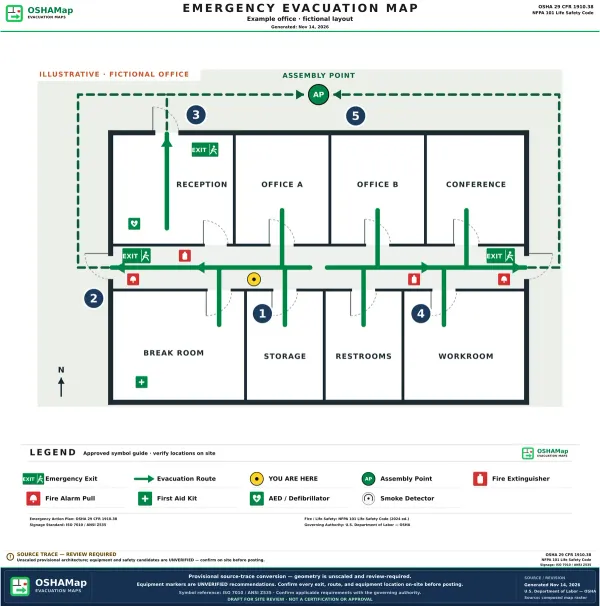
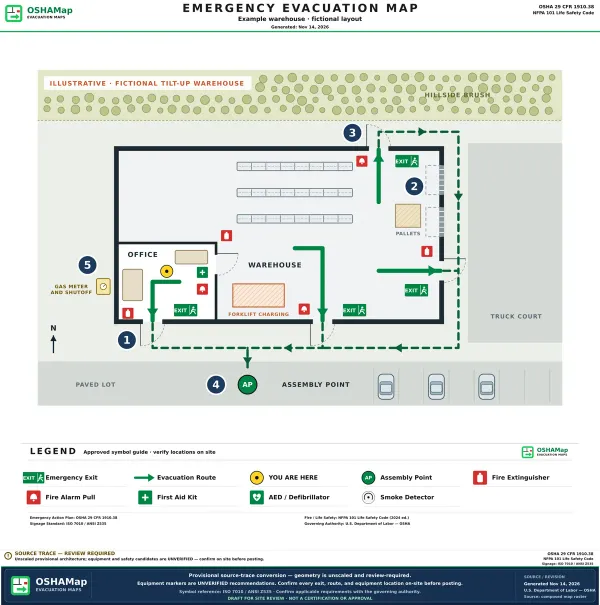
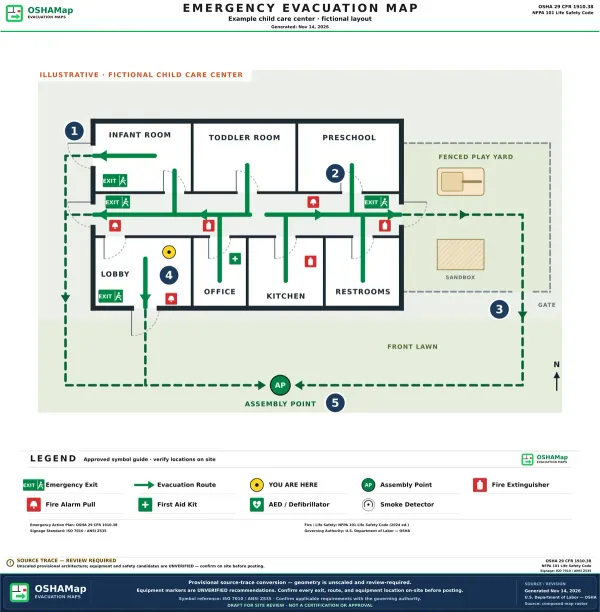
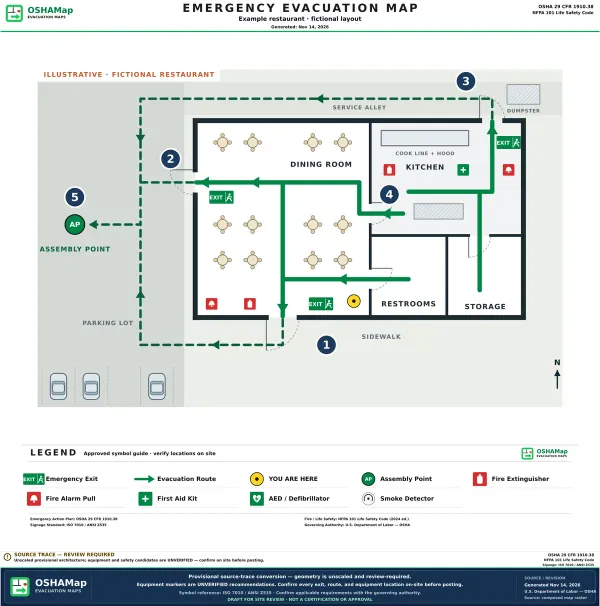
See four annotated sample maps

What is a free evacuation map generator?

Free evacuation map generator

A free evacuation map generator is an online tool that turns a floor plan into an evacuation map. OSHAMap opens floor plan images, PDFs, CAD files and photos of hand sketches in a map editor, where you place exit routes, equipment, assembly points and 'You Are Here' markers, or switch on AI generation to suggest them in a minute or two. A free account includes 5 free floor-plan uploads per month, with up to 5 regenerations per upload and requires no credit card; a qualified safety supervisor should review any map before posting.

Cost
Free — 5 free floor-plan uploads per month, with up to 5 regenerations per upload, no credit card
Generation Time
Editor opens right away; optional AI draft in a minute or two
Accepted Inputs
Images, PDFs, Office files, CAD (DWG/DXF), hand-sketch photos
Standards Referenced
OSHA 29 CFR 1910.36-39, NFPA 101
Map Elements
Exit routes, extinguishers, assembly points, You-Are-Here markers

A practical first draft, built for review

Starts right away

Your floor plan opens in the editor as soon as you upload it, with no software to install.

Guidance-informed

Drafts are designed around OSHA emergency-action and exit-route guidance, ready for a site-specific review.

Print-Ready Quality

Refine the draft in the editor, then export a clear file for your review and posting workflow.

Industry-Specific

Add workplace context for healthcare, manufacturing, restaurants, warehouses, schools, construction sites, and other facilities.

Works Anywhere

100% web-based. No software to install. Works on desktop, laptop, tablet, and mobile devices with any browser.

Any Floor Plan

Start with a JPG, PNG, PDF, CAD export, or hand-drawn sketch, then review and refine the generated draft.

Example evacuation maps, annotated

Four illustrated examples of fictional buildings, with notes on why each exit, route and meeting spot is where it is. Use them to check your own map, not as a copy.

Create online, review, then export

Free evacuation map creator: from floor plan to downloadable map

The browser-based creator accepts the layout you already have and produces an editable first draft. After your team confirms the routes and safety details, download the reviewed map for printing. A free account includes 5 free floor-plan uploads per month, with up to 5 regenerations per upload; no desktop app is required.

OSHA Evacuation Map Requirements Made Simple

Separate federal requirements from useful map content and local rules

What OSHA 29 CFR 1910.38 Requires

  • ✓
    Emergency Action Plans

    When an applicable OSHA standard requires an EAP, it addresses evacuation procedures and exit-route assignments. Federal OSHA does not require an EAP in every workplace.

  • ✓
    Clearly Marked Exit Routes

    Primary and secondary evacuation routes must be clearly identified and kept unobstructed at all times.

  • ✓
    Assembly Point Designation

    A site-specific plan may designate meeting locations for accountability after evacuation.

  • ✓
    Fire Equipment Locations

    Mark only equipment verified at the site; placement and travel-distance rules depend on the applicable standard and hazard.

  • ✓
    Accessible Routes

    Coordinate accessible egress and assistance information under the standards and codes that apply to the facility.

What Our Generator Includes

  • 🚪
    Primary & Secondary Exit Routes

    Color-coded arrows showing main and alternate evacuation paths from every location.

  • 📍
    "YOU ARE HERE" Markers

    Clear position indicators so anyone can orient themselves during an emergency.

  • 🧯
    Fire Extinguisher Mapping

    All extinguisher locations marked with 75ft travel distance coverage visualization.

  • 🏥
    First Aid & Safety Equipment

    AED locations, first aid kits, eye wash stations, and emergency equipment.

  • ♿
    ADA-Accessible Paths

    Wheelchair-accessible routes and evacuation chair locations clearly identified.

  • 📋
    Assembly Point & Emergency Info

    Outdoor gathering locations with emergency contact numbers and procedures.

Industry-Specific Evacuation Maps

Add relevant facility context, then verify industry- and site-specific requirements

🏥

Healthcare

Patient transport routes, oxygen shutoff valves, evacuation chairs, and Code Red procedures for hospitals, clinics, and nursing homes.

Healthcare Maps →
🏭

Manufacturing

Hazard zone mapping, LOTO stations, arc flash boundaries, and chemical storage areas for factories and production facilities.

Manufacturing Maps →
🍽️

Restaurants

Hood suppression systems, Class K extinguishers, gas shutoffs, and dual customer/employee exits for food service establishments.

Restaurant Maps →
📦

Warehousing

Dock door exits, forklift-free pedestrian zones, sprinkler controls, and FDC locations for distribution centers.

Warehouse Maps →
🏫

Education

Classroom accountability, lockdown positions, student routes, teacher checkpoints, and visitor management for schools.

School Maps →
🏢

Office Buildings

Multi-floor evacuation, stairwell capacities, elevator restrictions, and floor warden positions for commercial offices.

Office Maps →

Plus: Construction, Retail, Hotels, Churches, Gyms, Labs, and 40+ more industries.View All Industries →

Why Pay $500+ for Evacuation Maps?

See how our free generator compares to traditional options

Traditional Consultant
Our Free Generator
Cost Per Map
$500 - $2,000+
Free account: 5 free floor-plan uploads per month, with up to 5 regenerations per upload
Delivery Time
1-4 weeks
Editor opens right away; optional AI draft in a minute or two
Revisions
$100-300 per change
Up to 5 regenerations per included upload
OSHA Compliance
Site-specific review varies
OSHA-aligned draft for review
Industry-Specific
✓
✓
Print-Ready Quality
✓
✓
Multiple Locations
$$$$ per location
Bulk pricing available

See independent customer feedback

Read published reviews, then decide whether OSHAMap fits your team's workflow.

Create Your Evacuation Plan Online Free

Need to create an evacuation map online? Open your floor plan in the editor right away, or switch on AI for a draft of a small office, warehouse, or other workplace in a minute or two. A free account includes 5 free floor-plan uploads per month, with up to 5 regenerations per upload.

Upload a hand-drawn sketch, PDF blueprint, or photo and receive a map draft with suggested routes and markers. Verify exits, equipment, accessibility information, OSHA duties, adopted codes, and AHJ requirements before use.

✓ No software to install✓ No credit card required✓ Optional AI draft in a minute or two✓ OSHA-aligned output

The Complete Guide to Free Evacuation Map Makers

Evacuation maps can help communicate workplace emergency procedures. Federal OSHA does not impose one universal posted-map rule for every commercial building; adopted codes, permits, insurers, and AHJs may impose additional requirements. Traditionally, creating these maps involved consultants, lengthy timelines, and significant budgets. Our free evacuation map maker changes that paradigm entirely, giving businesses access to professional evacuation map generator technology at no cost.

Understanding OSHA Evacuation Map Requirements

The Occupational Safety and Health Administration (OSHA) mandates Emergency Action Plans (EAPs) under 29 CFR 1910.38 for most employers. For a complete breakdown of what OSHA inspectors expect, see our comprehensive OSHA evacuation map requirements guide. While OSHA doesn't explicitly require "evacuation maps" by name, the standard requires employers to provide "procedures for emergency evacuation, including type of evacuation and exit route assignments." In practice, this means evacuation maps—whether they're full evacuation maps, egress maps, or emergency exit maps—are the most effective way to communicate these critical procedures. Maps should also follow NFPA Life Safety Code guidelines.

The key elements OSHA expects in evacuation planning include:

  • Exit Route Assignments: Clearly designated paths from all work areas to emergency exits
  • Exit Locations: All emergency exits must be identified and accessible
  • Rescue and Medical Duties: Identification of personnel assigned to help others evacuate
  • Assembly Areas: Designated outdoor locations for employee accountability
  • Fire Protection Equipment: Locations of extinguishers, pull stations, and suppression systems

Why Traditional Evacuation Maps Are Expensive

The traditional process of creating evacuation maps involves multiple stakeholders and significant costs:

  • Safety Consultants: Professional fees range from $500-$2,000 per map depending on complexity
  • Architectural Reviews: Some consultants require CAD files or on-site measurements
  • Multiple Revisions: Each change request often costs $100-$300 additional
  • Long Timelines: Most consultants quote 1-4 weeks for delivery
  • Multi-Location Scaling: Costs multiply linearly for businesses with multiple facilities

For a business with 10 locations, traditional evacuation map creation could easily exceed $10,000-$15,000, not including the ongoing costs of updates when floor plans change.

How AI-Powered Evacuation Map Makers Work

Our free evacuation map maker leverages advanced artificial intelligence to analyze floor plan images and suggest candidates for review:

  • Room Boundaries: Walls, doors, windows, and structural elements
  • Exit Locations: Standard and emergency exits, stairwells, and elevators
  • Route Suggestions: Candidate primary and alternate paths for a site reviewer to verify
  • Equipment Markers: Locations that must be checked against equipment actually present
  • Accessibility Review: Candidate accessible routes and evacuation-chair markers to confirm

The AI applies industry-specific knowledge to customize maps. For example, healthcare facilities receive patient transport routes and oxygen shutoff locations, while manufacturing plants get hazard zone mapping and LOTO station indicators. This makes our evacuation map maker the ideal starting point for industry-specific review. For more specialized needs, explore ourfire exit maps and exit plan templates.

Industry-Specific Compliance Considerations

Healthcare Facilities

Hospitals, clinics, and nursing homes face unique evacuation challenges. Patients may be non-ambulatory, connected to medical equipment, or require specialized transport. OSHA's healthcare standards require evacuation plans that account for patient acuity levels and ensure continuous care during emergencies. Our generator includes patient evacuation routes, staging areas for horizontal evacuations, and locations of evacuation chairs and sleds.

Manufacturing and Industrial

Factories and production facilities must contend with machinery hazards, chemical storage, and specialized safety equipment. OSHA's 1910 General Industry Standards require hazard communication, lockout/tagout procedures, and emergency shutoff capabilities. Our manufacturing maps include color-coded hazard zones, LOTO stations, eye wash locations, and chemical storage boundaries.

Food Service and Restaurants

Commercial kitchens present fire risks from cooking equipment, especially deep fryers and grills. OSHA and local fire codes require specific suppression systems (typically hood-mounted) and Class K fire extinguishers rated for cooking oil fires. Our restaurant maps include hood suppression system locations, gas shutoff valves, and separate customer vs. employee exit routes.

Warehousing and Distribution

Large warehouses require evacuation planning that accounts for rack storage heights, forklift traffic patterns, and dock door operations. OSHA's warehouse safety requirements emphasize clear pedestrian pathways and separation from powered industrial trucks. Our warehouse maps designate forklift-free pedestrian zones, dock door exits, and sprinkler control valve locations.

State-Specific OSHA Requirements

Twenty-two states operate their own state-administered OSHA programs (State Plans) that may include requirements exceeding federal standards. California (Cal/OSHA), Michigan (MIOSHA), and Washington (L&I) are among states with additional evacuation and emergency-planning requirements. Selecting a state adds drafting context; it does not automatically apply or certify state-plan or local compliance.

When to Update Your Evacuation Maps

OSHA doesn't specify a mandatory update frequency for evacuation maps, but best practices and professional recommendations suggest updates whenever:

  • Floor plan changes occur (walls added/removed, exits modified)
  • Occupancy or use changes (new departments, equipment relocation)
  • Fire safety equipment is moved (extinguishers, pull stations)
  • Emergency procedures are modified
  • Annually as part of routine safety audits

With our free generator, updating maps is as simple as uploading a new floor plan—no additional consultant fees or lengthy wait times.

Professional Review Recommendation

While the editor and its optional AI drafts are built around OSHA guidance, we recommend professional review before final implementation. A qualified fire marshal, safety professional, or licensed engineer can verify that the generated map accurately reflects your specific facility conditions and meets all applicable local codes.

Getting Started with Our Free Evacuation Map Maker

Creating your first evacuation map with our evacuation map maker takes five steps:

  1. Gather Your Floor Plan: Any format works—CAD exports, architectural drawings, building blueprints, or even a clear photo of a hand-drawn sketch
  2. Upload to Our Map Maker: Drag and drop your floor plan image or PDF into the upload area above
  3. Add the Markings: Place exits, routes and equipment in the editor, or switch on AI generation (choose your industry and state for more relevant context)
  4. Review and Edit: Move, add or delete anything, then finish the final review
  5. Download: Save a PNG, JPG or PDF for printing

Register for 5 free floor-plan uploads per month, with up to 5 regenerations per upload—no credit card required. Use each result as a draft and confirm it with your safety team or AHJ before posting.

Evacuation Map Generator: Frequently Asked Questions

Disclaimer: OSHAMap produces an OSHA-aligned professional draft designed to support emergency planning. Final review should be confirmed by a qualified safety professional, fire marshal, or authority having jurisdiction (AHJ) before posting or using the map for emergency planning.

Ready to Use Our Free Evacuation Map Maker?

Start with the floor plan you already have and create an editable draft for your safety team to review.

Free to start in the editor. A free account includes 5 free floor-plan uploads per month, with up to 5 regenerations per upload for AI generation. No credit card required.