Free Evacuation Map Maker | Create OSHA Maps Online in 30 Seconds
Make professional, OSHA-compliant evacuation maps without paying a cent. Our free evacuation map maker transforms any floor plan or hand-drawn sketch into a print-ready evacuation map in 30 seconds. No design skills needed, no expensive software, no credit card required. Get 1 free upload with 5 regenerations.
No signup needed for preview. Free account for watermark-free downloads.
Free Evacuation Map Maker Tool
Upload your floor plan or hand sketch below. Our free evacuation map maker generates a professional, OSHA-compliant map in 30 seconds.
Create Your Free Map Maker Evacuation Map
Drag & drop your floor plan here
or
PNG, JPG, PDF - Hand-drawn sketches work too!
Professional Maps for Every Industry
Our AI creates OSHA-compliant maps tailored to your specific industry requirements
Restaurant Evacuation Map
Kitchen hood suppression, grease fire routes, and customer/employee exits clearly marked
Free preview • OSHA compliant • Print-ready in 30 seconds
Why Use a Free Evacuation Map Maker?
A free evacuation map maker removes every barrier between your business and OSHA compliance. Traditional evacuation map creation requires hiring safety consultants ($500-$2,000 per map), purchasing expensive CAD software ($200-$2,000/year), or spending hours learning complex drafting tools. Our free evacuation map maker eliminates all of these costs and complications.
Every workplace in the United States with 10 or more employees must have a written emergency action plan under OSHA 29 CFR 1910.38, which includes evacuation routes and procedures. Posting evacuation maps is a core requirement, yet many small businesses delay compliance because of the perceived cost and complexity. A free evacuation map maker solves this problem entirely—any business owner can create a compliant map in under 3 minutes.
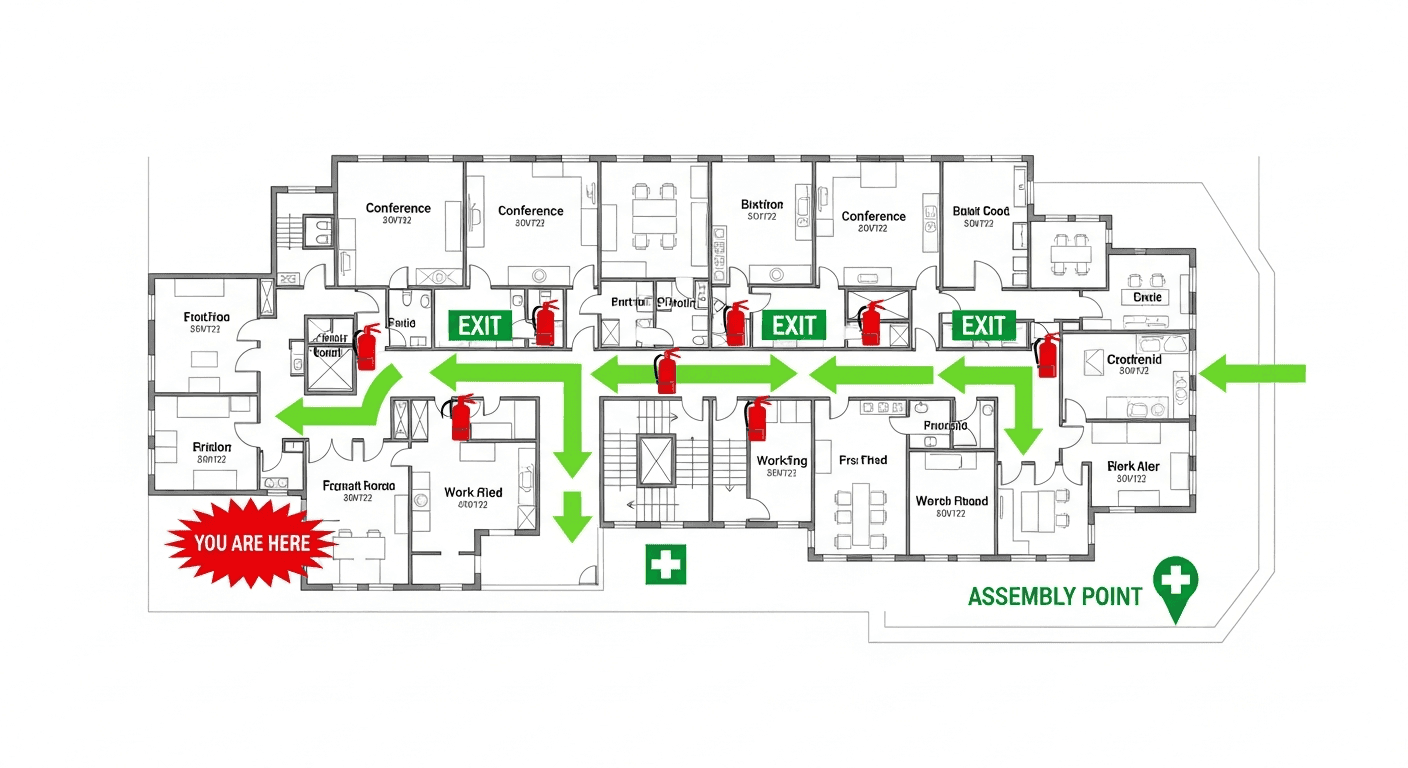
The quality gap between free and paid tools has disappeared thanks to AI technology. Our free evacuation map maker uses the same artificial intelligence engine as premium solutions, automatically identifying rooms, doors, and corridors from your uploaded floor plan. It places all required OSHA safety elements—exit routes, fire extinguisher positions, pull stations, assembly points, and ADA-accessible paths—without any manual placement. The result is a professional evacuation map that would cost $500+ from a consultant, generated in 30 seconds for free.
For small businesses, startups, restaurants, retail stores, and offices operating on tight budgets, a free evacuation map maker isn't just convenient—it's often the difference between being OSHA-compliant and risking fines of $15,625 or more per violation. Don't let cost be the reason your workplace lacks proper emergency exit plans.
How the Free Evacuation Map Maker Works
From hand sketch to professional evacuation map in four simple steps
Step 1: Draw or Upload
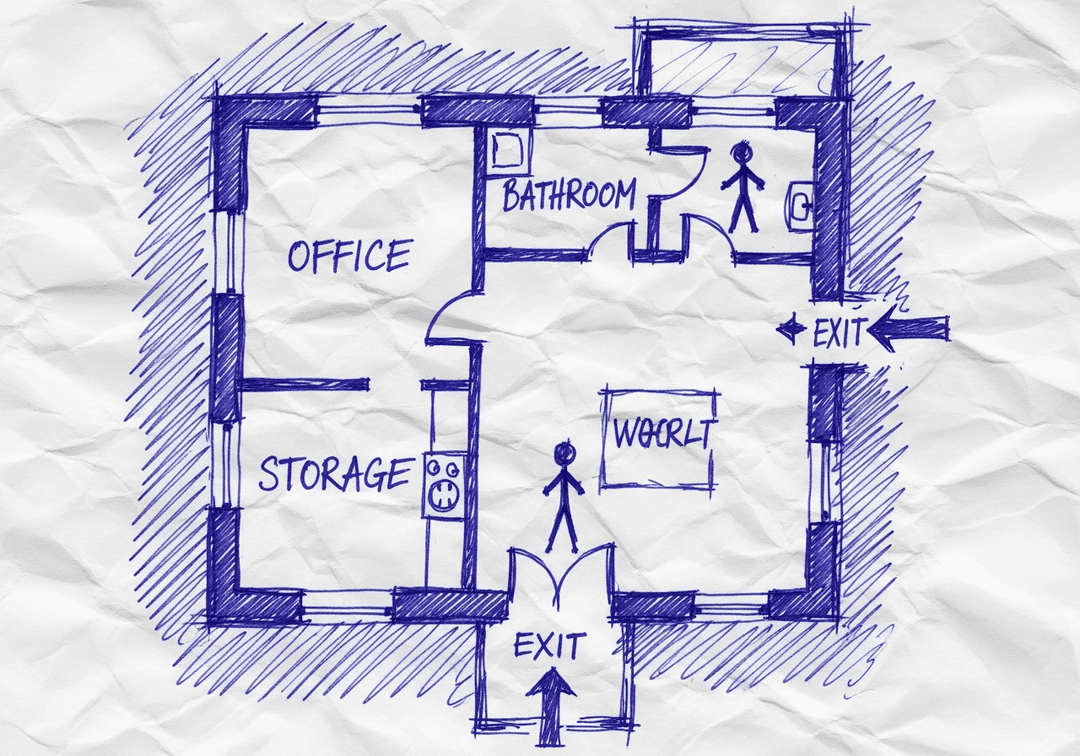
Sketch your floor layout on paper, a napkin, or a whiteboard. Show walls, doors, and rooms. Or upload an existing floor plan, blueprint, or CAD export. Our free evacuation map maker accepts JPG, PNG, PDF, and virtually any image format.
Step 2: Select Options
Choose your state and industry type from the dropdown menus. The free evacuation map maker applies state-specific fire codes and industry-relevant safety standards automatically. Options include 50 states and 17+ industry categories.
Step 3: AI Generates Your Map
Our free evacuation map maker AI processes your floor plan, identifies optimal evacuation routes, positions all safety equipment, marks assembly points, adds "You Are Here" indicators, and generates a print-ready, OSHA-compliant evacuation map—all in about 30 seconds.
Step 4: Download & Print
Download your evacuation map at full 300 DPI resolution—completely free with a registered account. Print on standard letter paper (8.5x11) or larger formats. Post at all required facility locations. Use your 5 free regenerations for different variations.
What's Included Free in Our Evacuation Map Maker
Everything you need to create compliant evacuation maps—without paying anything
1 Free File Upload
Upload one floor plan to our free evacuation map maker—hand sketch, photo, PDF, or CAD file. Any format accepted.
5 Free Regenerations
Generate up to 5 different versions of your evacuation map. Adjust industry, state, and preferences between regenerations.
No Watermark
Maps generated with a free account are completely watermark-free. Professional quality ready for posting and printing.
No Credit Card
Create your free account with just an email address. Zero payment information required to use the free evacuation map maker.
Full OSHA Compliance
Every free map includes all OSHA 29 CFR 1910.38 required elements: exit routes, safety equipment, assembly points, ADA paths.
Print-Ready 300 DPI
Download high-resolution maps optimized for standard print sizes. No degradation, no upscaling needed.
Industry Customization
Select from 17+ industry types. The free evacuation map maker tailors safety elements to your specific facility type.
Personal Dashboard
All maps are saved to your personal dashboard for easy access, re-downloading, and management. Maps never expire.
Professional Quality Output from a Free Tool
Our free evacuation map maker delivers the same quality as tools costing hundreds of dollars
NFPA 170 Standardized Symbols
Every map from our free evacuation map maker uses the nationally recognized NFPA 170 fire safety symbol set. Fire extinguishers, pull stations, emergency exits, and assembly points are represented with the exact symbols OSHA inspectors expect to see. This isn't a simplified or generic icon set—it's the professional standard used by fire marshals and safety engineers across the country.
Intelligent Route Optimization
Our free evacuation map maker AI doesn't just draw random lines to exits. It calculates the shortest safe path from every point in your building, considers corridor widths, identifies potential bottlenecks, and maps both primary and secondary evacuation routes. The algorithm follows the same logic professional fire protection engineers use when designing evacuation plans for large facilities.
State-Specific Compliance
Fire codes vary by state, and our free evacuation map maker accounts for these differences. California's Title 24, New York's Building Code, Texas Fire Prevention Laws—each state has unique requirements beyond federal OSHA standards. Select your state when generating your map, and the free evacuation map maker automatically applies the correct local compliance requirements.
Clean, Professional Design
Maps generated by our free evacuation map maker feature clean typography, high-contrast color coding, and clear spatial hierarchy. Exit routes are immediately identifiable. Safety equipment is prominently marked. The overall design meets the clarity standards required for emergency use—when seconds matter, your evacuation map must communicate instantly.
From Sketch to Professional Map — How AI Makes It Possible
Our free evacuation map maker uses advanced AI to understand even the roughest hand-drawn floor plans
What the AI Sees in Your Sketch
When you upload a hand-drawn sketch to our free evacuation map maker, the AI performs multiple analysis steps: it identifies wall boundaries from drawn lines, detects doorway openings in wall segments, recognizes room boundaries and proportions, interprets handwritten labels, and estimates actual spatial dimensions from relative positions. Even rough, imperfect sketches are successfully processed.
Sketch Tips for Best Results
Don't worry about artistic quality—the free evacuation map maker AI is designed to interpret rough drawings. For detailed guidance, check our sketch guide.
Beyond Sketches: Other Accepted Inputs
While our free evacuation map maker excels at converting hand sketches, it also processes: existing architectural floor plans, real estate listing floorplans, CAD exports (DWG converted to image), PDF building plans, photos of posted evacuation maps that need updating, and screenshots of online floor plan tools. Any visual representation of your space works as input for our free evacuation map maker.
Free Evacuation Map Maker vs Paid Alternatives
See why our free evacuation map maker outperforms expensive alternatives
When You're Ready for More: Upgrade Options
Start free and scale as your needs grow
Free Tier
$0- ✓ 1 file upload
- ✓ 5 regenerations
- ✓ No watermark (registered)
- ✓ Full OSHA compliance
- ✓ Print-ready 300 DPI
- ✓ Personal dashboard
Perfect for single-location businesses needing their first evacuation map.
Premium Plans
Starting at affordable rates- ✓ Unlimited file uploads
- ✓ Unlimited regenerations
- ✓ Multi-floor support
- ✓ Priority AI processing
- ✓ PDF report downloads
- ✓ Bulk map management
Ideal for property managers, safety teams, and multi-location businesses.
Start with the free evacuation map maker—upgrade only when you need more capacity.
Who Uses Our Free Evacuation Map Maker?
Trusted by safety professionals across every industry
Retail Store Owners
Create OSHA-compliant evacuation maps for customer-facing spaces. The free evacuation map maker handles high-occupancy layouts.
Restaurant Managers
Generate kitchen and dining area evacuation maps with fire safety equipment placements specific to food service.
Healthcare Facilities
Create patient evacuation routes with defend-in-place zones and smoke compartment boundaries.
Manufacturing Plants
Map production floor egress with hazard zone markings and machinery clearances using our free evacuation map maker.
Schools & Daycares
Classroom-by-classroom evacuation maps with age-appropriate assembly point coordination.
Office Managers
Quick, free evacuation maps for office spaces of any size. Perfect for lease renewals and annual safety reviews.
What Users Say About Our Free Evacuation Map Maker
Frequently Asked Questions About Our Free Evacuation Map Maker
Everything you need to know about making evacuation maps for free
Is this free evacuation map maker really free?
Yes, our free evacuation map maker is genuinely free to use. You can preview evacuation maps without signing up (with an evaluation watermark). Create a free account to get 1 free file upload with 5 regenerations, completely watermark-free—no credit card required. Your maps are saved to your personal dashboard. The free evacuation map maker includes full OSHA compliance, print-ready output, and all safety elements.
What can I upload to the free evacuation map maker?
Our free evacuation map maker accepts virtually any floor plan format: JPG, PNG, PDF, hand-drawn sketches on paper or napkins, photos of whiteboards, CAD exports, architectural blueprints, and even rough pencil drawings. Simply photograph your sketch and upload it to our free evacuation map maker. The AI analyzes any input format and transforms it into a professional evacuation map.
How fast does the free evacuation map maker generate maps?
Our free evacuation map maker generates professional, OSHA-compliant evacuation maps in approximately 30 seconds after uploading your floor plan. The entire process—from drawing a sketch to having a print-ready map—takes under 3 minutes. This makes our free evacuation map maker significantly faster than traditional methods that take hours or days with expensive software.
Are maps from this free evacuation map maker OSHA compliant?
Yes. Every map created by our free evacuation map maker includes all elements required by OSHA 29 CFR 1910.38: primary and secondary evacuation routes, emergency exit locations, fire extinguisher positions, fire alarm pull stations, assembly points, 'You Are Here' indicators, and ADA-accessible routes. The free evacuation map maker also uses NFPA 170 standardized fire safety symbols.
Can I print maps from the free evacuation map maker?
Absolutely. All evacuation maps generated with a free account through our free evacuation map maker are print-ready at high resolution (300 DPI). Maps are optimized for standard print sizes including letter (8.5x11), legal (8.5x14), and tabloid (11x17). Download your map as a high-quality image and print on any office printer or send to a professional print shop.
Do I need design skills to use this free evacuation map maker?
No design skills are needed. Our free evacuation map maker is designed for anyone—facility managers, business owners, safety coordinators, and individuals with no technical background. Draw your floor layout on paper, upload a photo, and the free evacuation map maker AI handles everything: identifying rooms, placing safety equipment, mapping exit routes, and generating a professional evacuation map.
What makes this free evacuation map maker better than paid software?
Our free evacuation map maker offers advantages that paid alternatives like Visio ($170/year), AutoCAD ($1,975/year), or SmartDraw ($119/year) cannot match at their price point: zero design skills required, hand-sketch recognition (no CAD needed), 30-second generation (not hours), automatic OSHA compliance, state-specific customization, and a free tier that handles most small business needs.
Can I create multiple maps with the free evacuation map maker?
The free tier of our evacuation map maker includes 1 file upload with 5 regenerations per map. Each regeneration lets you adjust industry type, state compliance, and other preferences. For businesses needing maps for multiple floors or locations, premium plans offer unlimited file uploads and regenerations. But many single-location businesses find the free evacuation map maker tier covers their needs completely.
How does the sketch-to-map feature work in the free evacuation map maker?
Our free evacuation map maker uses advanced AI to interpret hand-drawn sketches. Draw your floor layout on any surface—paper, napkin, whiteboard, or notebook. Include basic elements like walls, doors, and room labels. Take a photo and upload it. The free evacuation map maker AI recognizes your sketch, converts it into a clean floor plan, adds all required safety elements, and generates a professional evacuation map.
What happens after I use my free evacuation map maker credits?
After using your 1 free upload and 5 regenerations, you can upgrade to a premium plan for unlimited maps. Premium plans include unlimited file uploads, unlimited regenerations, multi-floor support, priority processing, and downloadable PDF reports. However, many users find the free evacuation map maker tier sufficient for their initial compliance needs, and you can always create a new account for additional free maps.
Get Free OSHA Compliance Resources
Enter your email to receive free checklists, guides, and compliance tips
The free compliance checklist helped us identify 5 safety gaps we didn't know existed!
By continuing, you agree to our Privacy Policy
Create Your Free Evacuation Map
Professional OSHA-compliant maps in under 60 seconds
Create Free Map Now →Important Legal Disclaimer
The Occupational Safety and Health Administration (OSHA) does not approve, endorse, recommend, or certify any commercial products or software. This platform is a compliance assistance tool only and is not affiliated with or endorsed by OSHA or any government agency.
All AI-generated evacuation maps, safety plans, and compliance documents must be reviewed, verified, and approved by a qualified safety professional, fire marshal, licensed engineer, or appropriate authority before being posted, distributed, or used for emergency planning purposes.
Employers retain full legal responsibility for workplace safety under the Occupational Safety and Health Act of 1970 (OSH Act). Users are solely responsible for ensuring compliance with all applicable local, state, and federal regulations. This software does not guarantee OSHA compliance.
This software does not constitute legal, safety consulting, engineering, or professional advice. Content is for informational purposes only. Users should consult qualified safety professionals and legal counsel for compliance guidance specific to their operations.
While we strive for accuracy, workplace safety regulations change frequently. We make no warranties regarding the accuracy, completeness, or current validity of any information. Users must independently verify all regulatory requirements applicable to their specific circumstances.
To the maximum extent permitted by law, OSHAMap, its owners, operators, affiliates, and licensors shall not be liable for any direct, indirect, incidental, special, consequential, or punitive damages arising from use of this service, including but not limited to workplace injuries, OSHA violations, regulatory fines, property damage, or any other losses.
Cost comparisons and savings estimates are based on industry averages for professional safety consultant fees and are provided for informational purposes only. Actual costs, savings, and results may vary significantly based on your specific situation.
By using OSHAMap, you acknowledge that you have read, understood, and agree to be bound by these terms. For complete terms, see our Terms of Service and Privacy Policy.