
Free Office Workplace Safety Assessment
Request a free Workplace Safety Assessment for the work in your office, also known as an office workplace risk assessment. Send the form and our team will call you to arrange it. Identify job hazards, review existing controls and organize practical corrective actions across routine and nonroutine tasks.
Free assessment. No credit card required. Send the form and our team will call you to arrange it.
- Desk and screen work
- Walking between work areas
- Storage and document handling
- Office equipment and charging
- Deliveries and shared facilities
- Reception and public contact
- Late work and off-site duties
- Moves, maintenance and emergencies
Request your free Workplace Safety Assessment
Six quick fields. Our team will call the number you give to arrange your free assessment.
- A call from our team to arrange your free assessment
- A review of your jobs, including cleaning and maintenance, and the controls that need attention
- Free printable job-hazard worksheets with your account
What happens after you send the form
- You send the form. No credit card is needed.
- Our team calls the phone number you give.
- Together we arrange your free Workplace Safety Assessment.
Meanwhile, you can print the job-hazard worksheet with your free account.
Desk, reception and shared-building jobs we help you review
| Job or task | Hazards to review |
|---|---|
| Desk and screen work | Discomfort, sustained posture, repetition, reach and adjustability. |
| Walking between work areas | Floor condition, cables, spills, stairs and temporary obstructions. |
| Storage and document handling | Lifting, unstable items, difficult reaches and access equipment. |
| Office equipment and charging | Damaged equipment, unsuitable use, maintenance and electrical concerns. |
| Deliveries and shared facilities | Loads, visitors, cleaning and building-management responsibilities. |
| Reception and public contact | Aggression concerns, communication and response arrangements. |
| Late work and off-site duties | Lone work, travel or other tasks assigned by the employer. |
| Moves, maintenance and emergencies | Changing layouts, contractors, unusual work and assistance arrangements. |
Use the job list as a starting point. Include workers, contractors and shifts that encounter different conditions. Add tasks or hazards that are missing, and keep unreviewed items open.
Look beyond the workstation
Review what people actually do during a full working day. A receptionist, records clerk, cleaner and office-based field worker can encounter different hazards. Ask when work is difficult or discomfort occurs, and record whether the employer controls the condition or needs to coordinate with the building manager. Keep a referred action open until the responsible person verifies the correction.
What the office assessment looks at for each role
For each job, identify who could be injured or exposed, how the harm could occur and what controls are already in place. Consider the severity and likelihood of harm and the people exposed when prioritizing actions. Record the basis for the priority instead of treating a number as an OSHA pass.
Use the review to build a job-hazard summary and action list. Record additional controls, owners, target dates and how the result will be checked. Where information is missing, identify the verification or specialist input needed.
Office Workplace Safety Assessment example
An office team repeatedly moves heavy archive boxes from high shelving before client meetings. The assessment records frequency, reach, access and who carries the boxes. The team reviews storage location, handling aids and the work method, then verifies the change during the next archive retrieval. A new chair would not resolve this particular task.
Free. Tell us the jobs and the concern you want reviewed, and our team will call you.
What to gather before the office review
Describe roles, workstations, storage, visitors, delivery arrangements and work outside normal hours. Include cleaning or maintenance work carried out for your business. Bring employee concerns and recent changes to equipment, staffing or the office layout.
The free request starts the review process: our team calls the number you give to arrange the assessment. Describe the main concern and the work involved so that call can cover it. Address immediate serious dangers through the responsible people without waiting for the appointment.
Record each office role on the job-hazard worksheet
Record the workplace, task, people exposed, existing controls and further actions. The accompanying hazard screen covers fifteen categories, including equipment, chemicals, physical demands, health exposures, work organization and emergencies. Add other job-specific hazards and record why a category does not apply. Review findings after relevant changes and verify actions under actual working conditions.
Workstation screening can identify concerns for follow-up; it does not diagnose an injury or prescribe one equipment setting for every worker.
For a walk-through of desks, storage and shared areas, use the worksheet as your OSHA self-inspection checklist. OSHA’s Small Business Safety and Health Handbook offers self-inspection checklists as a starting point for identifying hazards; this worksheet follows the same idea but is not an OSHA form.
Free account needed. It opens a printable page; use your browser's Print or Save as PDF.
- Identified
- Not yet reviewed
- Not applicable + reason
- Machinery and energy
- Vehicles and mobile equipment
- Slips, trips and falls
- Electricity
- Chemicals
- Physical demands
- Noise and vibration
- Heat, cold and physical agents
- Biological hazards
- Fire and emergencies
- Restricted spaces
- Violence and lone work
- Work organization
- PPE gaps
- Additional job-specific hazards
Plus a job register and an additional-hazards field. A category left blank stays open; it never counts as a pass.
How do you run a workplace safety assessment for an office?
Office hazards are low-key but constant, and a lot of them sit with individual desks. A sensible way through:
- Walk the floor plan: desks, meeting rooms, print and copy area, kitchen, storage and file rooms, server or electrical closets, and the stairs.
- Look at trip and fall points: cables across walkways, open drawers, boxes in corridors, wet kitchen floors and poorly lit stairs.
- Check heavy or tall furniture: filing cabinets that tip when several drawers open, shelving that is not fixed to the wall, high storage reached from chairs.
- Review workstations person by person with a short checklist (see the next section), including shared and hybrid desks.
- Cover the less visible risks: working late alone, visitors and reception security, business travel and driving, and work done at home.
- Confirm the emergency arrangements, then rate the findings and give each fix an owner. Re-check workstations after people have used the changes for a few weeks.
What should an office workstation assessment checklist include?
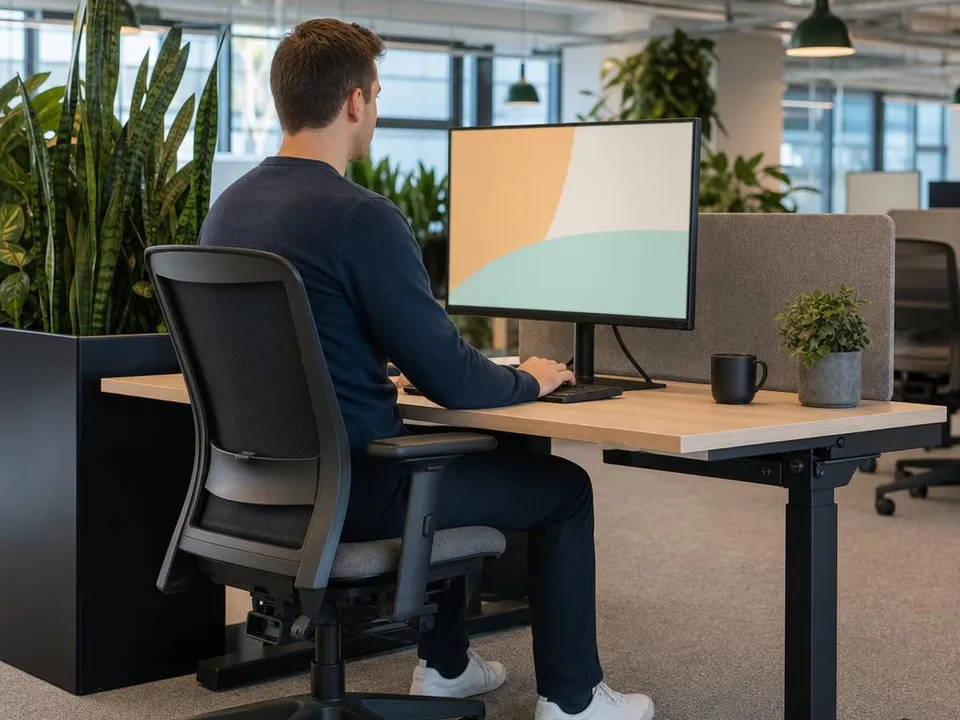
OSHA's computer workstations eTool includes an evaluation checklist; a "no" answer points to the part of the setup to fix. Items worth copying into your own form:
- The top of the screen sits at or below eye level, so the user reads it without bending the head or neck down or back; bifocal and trifocal wearers can read it without tilting the head back.
- The monitor sits directly in front of the user at a distance they can read without leaning in or back, with no glare from windows or lights.
- The backrest adjusts in height to support the lower back, and the chair stands on a sturdy five-leg base.
- Forearms sit roughly parallel to the floor, wrists stay straight, and the mouse sits right next to the keyboard.
- Feet rest flat on the floor or on a stable footrest when the desk cannot be adjusted.
- Laptops used as the main computer get a separate keyboard and mouse and are set up like a desktop.
- A headset, if used, fits comfortably; the phone sits within easy reach.
- The user can alternate between sitting and standing, and the work allows short breaks from the keyboard.
When does California's repetitive motion rule apply to office work?
California's ergonomics standard (8 CCR 5110) is narrow. It applies to a job, process or operation only when all of these are true:
- More than one employee has a repetitive motion injury.
- Each injury is predominantly caused (50 percent or more) by a repetitive job, process or operation.
- The employees were performing a job process or operation of identical work activity, such as word processing, assembly or loading.
- A licensed physician objectively identified and diagnosed the injuries.
- The injuries were reported to the employer in the last 12 months.
Once it applies, the employer needs a program with three parts: a worksite evaluation of each such job, control of the exposures that caused the injuries, and training for the employees involved. Word processing is named in the rule, so an office with repeated keyboard injuries should check the conditions carefully.
How would an office safety assessment rate shared and hybrid desks?
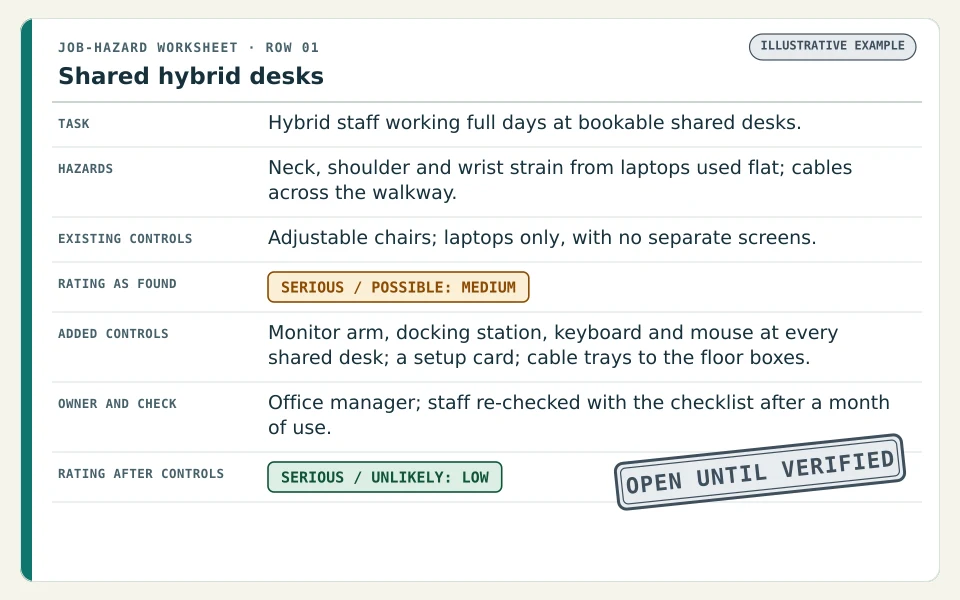
In this fictional firm, staff book any free desk on their office days and work on their laptops. The entry shows how a shared-desk setup is rated.
| Worksheet field | Entry |
|---|---|
| Task | Hybrid staff working full days at bookable shared desks. |
| Hazards | Neck, shoulder and wrist strain from laptops used flat on fixed-height desks; cables trailing across the walkway to floor boxes. |
| Existing controls | Adjustable chairs at every desk; laptops only, with no separate screens. |
| Rating as found | Serious / Possible: Medium |
| Added controls | Monitor arm, docking station, keyboard and mouse at every shared desk; a one-page setup card on each desk; cable trays to the floor boxes; sit-stand desks for staff with a documented need. |
| Owner and check | Office manager; a sample of staff re-checked with the workstation checklist after a month of use. |
| Rating after controls | Serious / Unlikely: Low |
Shared desks need a setup that any user can adjust in a minute. If the setup card goes unread, the rating has not really moved, which is why the follow-up asks staff rather than just counting equipment.
What must an office emergency action plan include?
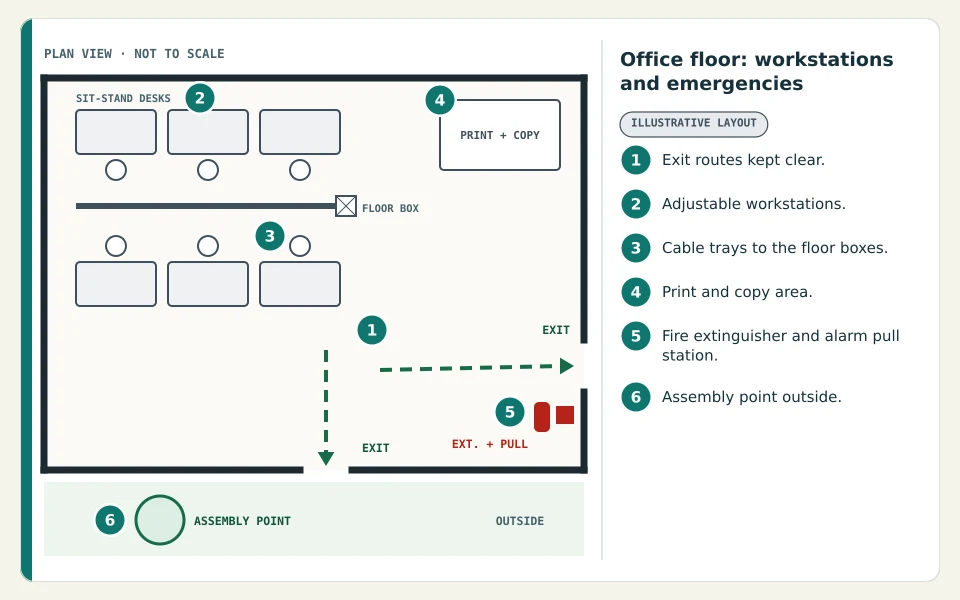
When an OSHA standard requires an emergency action plan, it has to be written down, kept at the workplace and available to employees; an employer with 10 or fewer employees may communicate it orally instead (29 CFR 1910.38(b)). At a minimum the plan covers (29 CFR 1910.38(c)):
- How to report a fire or other emergency.
- Evacuation procedures and the exit route each person uses.
- What staff who stay behind to run critical operations do before they leave.
- How everyone is accounted for after the evacuation.
- Who performs rescue or medical duties.
- The name or job title of whoever employees can contact for more information about the plan.
In a multi-tenant building, line your plan up with the building's own procedures and assembly points. Posting a clear office evacuation map on each floor helps people find their route. Contact centers, financial offices and law firms can find industry overviews in the call center, finance and legal safety guides.
Questions about the free Workplace Safety Assessment
Which office jobs can be included?
Include workstation work, handling, equipment use, public contact, cleaning, shared areas and nonroutine duties as relevant to your employees.
Can a call center use it?
Yes. Adapt the review to sustained screen or headset work, repetition, shift patterns, employee concerns and the actual premises.
Who handles hazards in a shared building?
Record who controls the area or system, coordinate with the responsible party and verify that the issue is resolved.
Should remote or traveling duties be mentioned?
Yes. Describe work assigned by the employer so the review can identify what additional task or work-location assessment may be needed.
Do office tasks ever need a job hazard analysis (JHA)?
Some do. Moving furniture during an office move or clearing a shredder jam can be broken into steps with a job hazard analysis (JHA). The Workplace Safety Assessment reviews the office as a whole and highlights tasks like these.
Ask for your free Workplace Safety Assessment
Tell us the jobs involved and the concerns you want reviewed. Our team will call you to arrange your free assessment.
Sources: OSHA computer workstations; OSHA walking-working surfaces; OSHA Small Business Safety and Health Handbook (self-inspection checklists); OSHA Job Hazard Analysis booklet; OSHA computer workstations eTool evaluation checklist; Cal/OSHA 8 CCR 5110 repetitive motion injuries; 29 CFR 1910.38 emergency action plans.
Related tools for specific tasks
These go deeper on one task or hazard. They support the broader job review; they do not replace it.
Workplace Safety Assessment for other industries
Each guide lists common jobs, hazard prompts and a printable worksheet for that kind of workplace.
- Manufacturing Workplace Safety AssessmentProduction, setup, jam clearing, maintenance and shutdowns.
- Warehouse Workplace Safety AssessmentReceiving, forklifts, racking, picking, docks and battery charging.
- Restaurant Workplace Safety AssessmentPrep, hot cooking, dishwashing, cold storage and closing shifts.
- Retail and Grocery Workplace Safety AssessmentDeliveries, stocking, box cutting, checkout and spill response.
- Healthcare Workplace Safety AssessmentPatient handling, sharps, disinfection, equipment and shift work.
- Auto Repair Workplace Safety AssessmentVehicle lifts, tires, batteries, solvents, exhaust and refinishing.
- Cleaning and Janitorial Workplace Safety AssessmentCleaning chemicals, wet floors, floor machines, waste and lone work.
- Hotel Workplace Safety AssessmentHousekeeping, laundry, kitchens, maintenance and guest contact.
Published by OSHAMap, a product of GetAgenticApps LLC · 131 Continental Dr, Suite 305, Newark, DE 19713, United States.
OSHAMap is an independent service and is not affiliated with OSHA or any government agency. The review and worksheets are not an OSHA inspection, government approval or compliance certification. Spotted something to correct? Contact us.