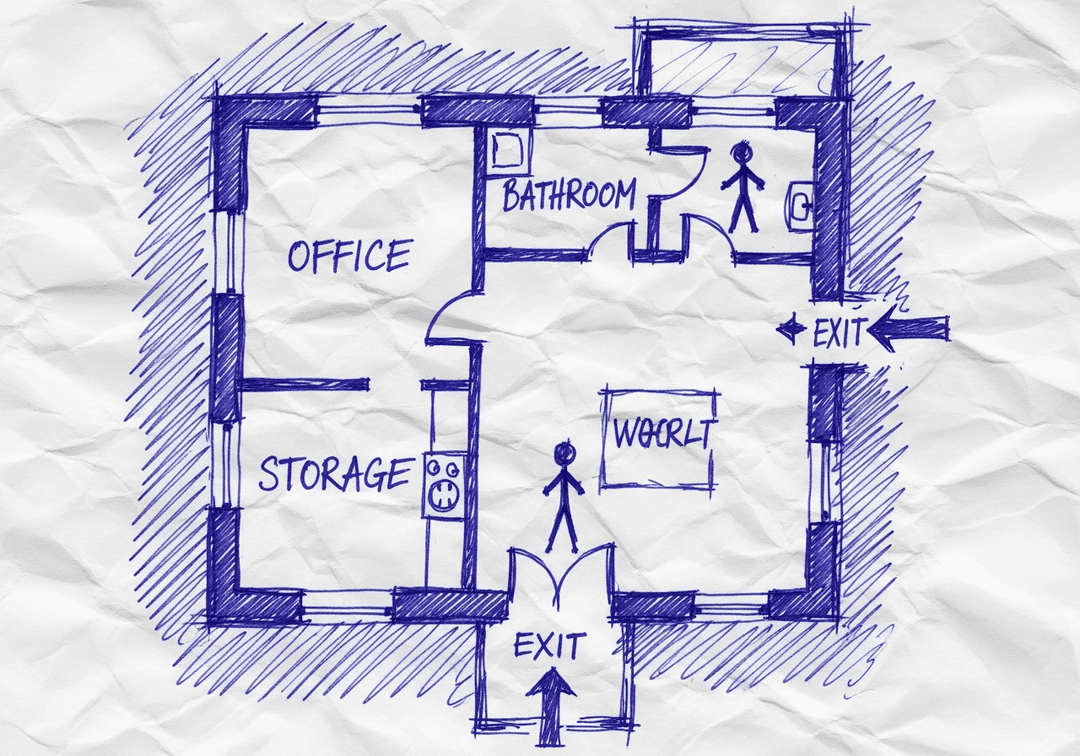
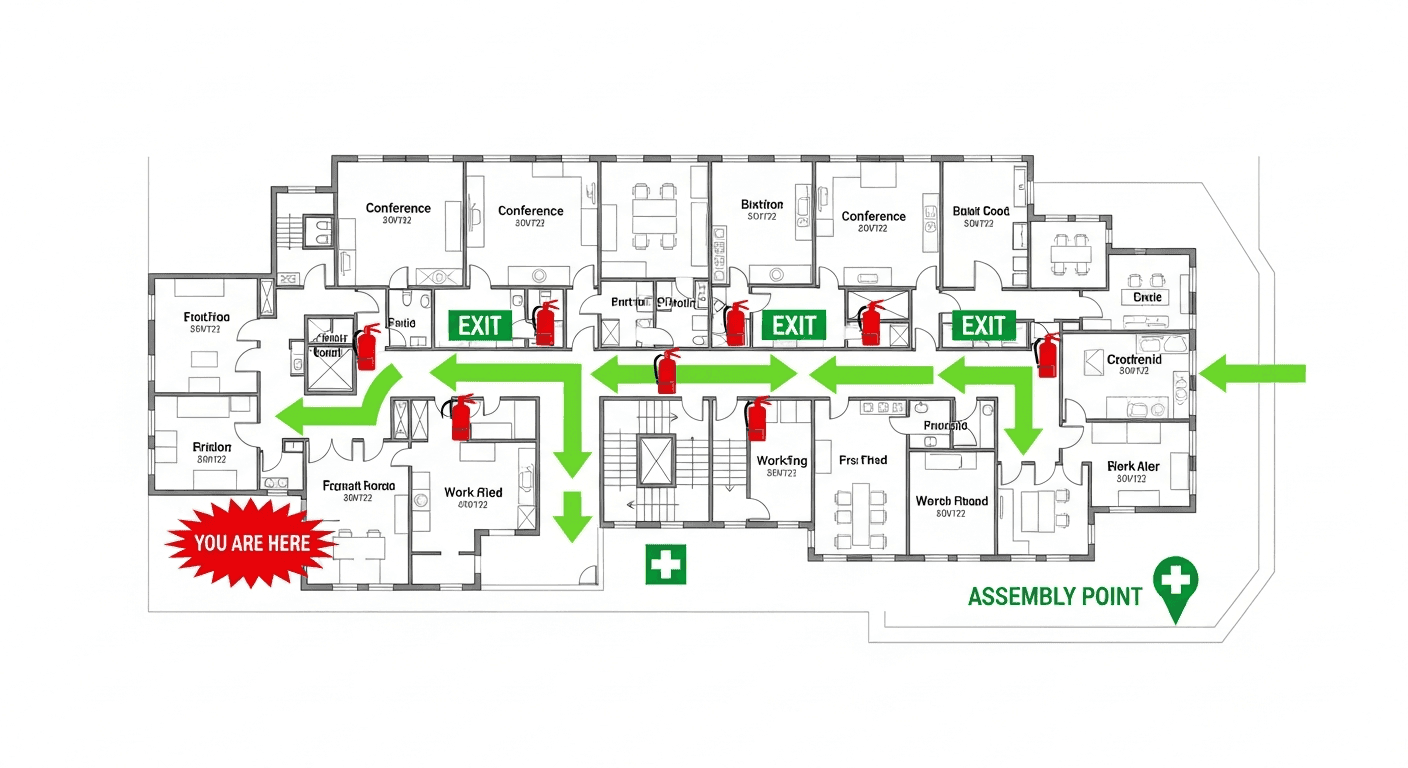
Every facility is different. AI-powered map generation creates evacuation plans tailored to your specific floor plan and layout.
Generate your map in under 2 minutes
Trusted by Safety Leaders Nationwide
Join thousands of businesses that chose professional OSHA compliance
🗺️15,000+Maps Generated
🏢7,500+Businesses Protected
🇺🇸50States Covered
⚡< 30 secAverage Generation Time
"
Saved us $8,000 in consultant fees. The AI understood our warehouse layout perfectly.
Mike R.Operations ManagerMidwest Distribution Co.
★★★★★
⚠️
OSHA Non-Compliance Risk
Serious ViolationUp to $16,550
Willful/RepeatedUp to $165,514
Failure to Abate$16,550/day
Professional evacuation maps demonstrate due diligence and reduce liability exposure
Get Your Professional Map in 2 Minutes
No consultants. No waiting. No guesswork.
🔒256-bit Encryption
✅OSHA 29 CFR 1910.38
🖨️Print-Ready Quality
💯Professional Quality
Experience Site-Specific Guidance Today
Upload your floor plan and get a professional OSHA-compliant evacuation map in under 2 minutes
📤
Upload
⚡
Generate
✅
Download
📊 5 Free Regenerations Left
Create Your Site-Specific Guidance Evacuation Map
📷
Clear ImageUse a clean, high-quality scan or photo
↔️
Correct OrientationImage should be right-side up, not rotated or sideways
🔍
No ZoomCapture the entire floor plan, avoid zooming in on sections
💡
Good LightingThe clearer and less blurry, the better results
📁
Drag & drop your floor plan here
or
PNG, JPG, PDF - Hand-drawn sketches work too!
🔒Your files are private: never shared, stored temporarily, deleted automatically.
Compliance Options
🔥 NEW✨
Customize Your Map
Add special requests for your safety map - tell our AI exactly what you need!
🎯Add specific details like "Mark fire extinguisher near kitchen"
📍Request specific zones: "Highlight assembly point in parking lot"
🏥Add safety equipment: "Include AED location near reception"
0/2000
Quick Add:
Frequently Asked Questions
Is this evacuation map generator really free?
Yes — you can generate your first OSHA-compliant evacuation map completely free. Just upload a floor plan and our AI creates a professional map in about 30 seconds. No credit card required.
Are the generated maps OSHA-compliant?
Our AI follows OSHA 29 CFR 1910.36–37 and NFPA 101 Life Safety Code standards. Every map includes clearly marked exits, fire extinguisher locations, assembly points, and directional evacuation arrows.
What file formats can I upload?
We accept JPG, PNG, and PDF floor plans. For best results, use a clear, high-resolution image of your floor plan with visible walls, doors, and rooms.
How long does map generation take?
Most maps are generated in 20–40 seconds. Complex multi-floor plans may take slightly longer. You can download your map immediately after generation.
Can I edit the map after generation?
The generated map is a high-resolution image you can download and print. For custom edits or enterprise features like multi-floor support and branded maps, check our pricing plans.
Is my floor plan data secure?
Yes. All uploads are encrypted in transit (TLS 1.3) and processed in secure cloud environments. We do not share your floor plans with third parties.
🏆Top Converting Industries
Professional Maps for Every Industry
Our AI creates OSHA-compliant maps tailored to your specific industry requirements
🔍 Click to enlarge
🍳 Restaurant & Food Service
Restaurant Evacuation Map
Kitchen hood suppression, grease fire routes, and customer/employee exits clearly marked
✓ Hood Suppression System✓ Class K Extinguishers✓ Dual Exit Routes✓ Customer Flow Paths
94%Compliance Rate
~30sGeneration Time
Free preview • OSHA compliant • Print-ready in 30 seconds
Proven Results
Tailored Safety for Your Unique Facility
Data-driven proof of site-specific guidance
Before vs. After Metrics
Site-Specific Compliance
Before: Generic procedures
After: Customized protocols
Source: Safety audits
Local Hazard Addressing
Before: 40% addressed
After: 100% addressed
Source: Hazard assessments
Employee Relevance Rating
Before: 52% find useful
After: 96% find useful
Source: Training feedback
Regulatory Applicability
Before: General compliance
After: Jurisdiction-specific
Source: Regulatory review
Common Objections - Crushed
"Standard templates work fine"
Reality: Every facility has unique hazards, layouts, and requirements
Evidence: Site assessment data
"Customization is expensive"
Reality: AI adapts to your floor plan automatically at no extra cost
See the benefits firsthand. Generate your compliant evacuation map in under 2 minutes.
Immediate ROI - No commitments
Key Benefits of Site-Specific Guidance
✓Customized to your layout
✓Accounts for unique features
✓Not generic templates
✓Specific to your needs
😓 Traditional Obstacles
Generic one-size-fits-all plans
Don't account for specifics
Miss unique hazards
✨ OSHAMap Advantage
AI analyzes your specific floor plan for customized guidance
🏢Trusted by 7,500+ businesses nationwide🇺🇸Used in all 50 States🗺️Over 15,000 evacuation maps generated🔒Built on secure, encrypted infrastructure✅OSHA-compliant US standards
From Napkin Sketch to Professional Map: Site-Specific Guidance
Experience site-specific guidance when you transform any floor plan into a compliant evacuation map
✏️Your Sketch
Hand-drawn on paper
Rough layout
Basic room labels
⚡AI Magic~30 seconds
✅Professional Result
🧯 Fire Extinguishers
🚪 EXIT Signs
➡️ Evacuation Routes
📍 YOU ARE HERE
👥 Assembly Point
🏥 First Aid
Works with photos, scans, PDFs, CAD files, or even hand-drawn napkin sketches
✓ 100% OSHA Compliant
✓ Instant Results (~30 sec)
✓ Print-Ready (11x8.5" or 17x11")
How Our AI Delivers Site-Specific Guidance
Do I need design skills to create an evacuation map?
No design skills are required. Our AI understands hand-drawn floor plans, smartphone photos, scanned blueprints, and PDF documents. Simply upload any representation of your facility layout and receive a professional-grade emergency evacuation map instantly.
Are the generated maps OSHA compliant?
Yes, every generated map meets OSHA 29 CFR 1910.38 Emergency Action Plan requirements including clearly marked exit routes, fire extinguisher locations within 75-foot travel distance, assembly points, YOU ARE HERE markers, and accessibility accommodations per ADA guidelines.
Can I update my evacuation map after renovations?
Yes, unlimited revisions are included. If you renovate your office or add a new emergency exit, simply re-upload your updated floor plan and generate a new compliant map instantly. All free maps include unlimited regeneration so you always have current evacuation documentation.
What types of buildings can use this evacuation map generator?
Our generator works for any building type including warehouses, manufacturing plants, healthcare facilities, schools, retail stores, and office buildings. The AI adapts to any facility size and layout, generating appropriate exit routes, fire safety equipment placement, and assembly point locations.
Key Statistics: Site-Specific Guidance
Understanding the numbers behind site-specific guidance helps prioritize your safety planning.
1 in 59Inspection ProbabilityEmployers face random OSHA inspections