(775) 317-4488|Need help with your map? Call or chat with us!support@oshamap.com
BENEFIT
🔧

Facility Modernization

Last reviewed: June 8, 2026 · Reviewed by OSHAMap Safety Editorial Team · Review with a qualified safety professional when required.

Modernize your safety infrastructure

Outdated safety materials reflect poorly on your organization. Professional evacuation maps modernize your facility's safety infrastructure.

Generate your map in under 2 minutes

Experience Facility Modernization Today

Upload your floor plan and get a professional OSHA-aligned evacuation map in under 2 minutes

📊 5 Free Maps Left

Create Your Facility Modernization Evacuation Map

See the safety plan from every angleWatch a sketch become a polished map, then step inside.Watch demo Need to start from a rough layout?Sketch rooms and exits, then turn it into a clear safety map.Draw your map
✏️
High ContrastUse dark ink on white paper. Bold lines help our AI detect walls accurately
📐
Top-Down AnglePhotograph from directly above — tilted angles distort the geometry
🏷️
Label RoomsWrite "Exit", "Storage", "Breakroom" etc. — our AI reads your labels for compliance
🔍
Full Floor PlanCapture the entire layout including all walls, doors, and exits — no cropping
🚪
Mark ExitsCircle or label exit doors with a red dot or "EXIT" text for best detection
💡
Good LightingAvoid shadows and glare — even lighting produces the sharpest results
📁

Drag & drop your floor plan here

or

PNG, JPG, HEIC, TIFF, BMP, SVG, AVIF, WebP, PDF, DOC, DOCX, PPT, PPTX, XLS, XLSX, ODT, ODP, ODS, DXF, DWG - Hand-drawn sketches work too!

or

No floor plan handy? Try the included floor plan with real AI generation — no upload needed. This may take a minute or longer.

Edit your map for free.
Move, resize, and recolor every exit sign, route, and icon.
Create a free account to save and download in HD. No credit card required.
FREE
🔒Your files are private: never shared, stored temporarily, deleted automatically.

Compliance Options

🔥 NEW✨

Customize Your Map

Add special requests for your safety map - tell our AI exactly what you need!

  • 🎯Add specific details like "Mark fire extinguisher near kitchen"
  • 📍Request specific zones: "Highlight assembly point in parking lot"
  • 🏥Add safety equipment: "Include AED location near reception"
0/2000

Quick Add:

Automatic (recommended)

Redraw the architecture from your floor plan first, then add editable safety markings. The original upload remains a reference, not the map background.

Frequently Asked Questions

Is this evacuation map generator really free?

Yes — you can generate your first OSHA-aligned evacuation map draft completely free. Just upload a floor plan and our AI drafts a professional map in about 30 seconds. No credit card required.

Are the generated maps aligned with OSHA?

Our AI drafts maps that follow OSHA 29 CFR 1910.36–37 and NFPA 101 Life Safety Code standards. Every map includes clearly marked exits, fire extinguisher locations, assembly points, and directional evacuation arrows. Supervisor review is required before posting to your facility.

What file formats can I upload?

We accept PNG, JPG, GIF, WebP, BMP, TIFF, AVIF, HEIC, SVG, PDF, DOC/DOCX, PPT/PPTX, XLS/XLSX, ODT, ODP, ODS, DXF, and DWG floor plans. Office and CAD files are converted securely before processing; PDF uploads let you choose the source page.

How long does map generation take?

Most maps are generated in 20–40 seconds. Complex multi-floor plans may take slightly longer. You see the preview instantly — create a free account (no credit card) to download the file.

Can I edit the map after generation?

Yes — every generated map opens in a free drag-and-drop editor where you can move, resize, and recolor exit signs, routes, and equipment icons. Enterprise features like multi-floor support and branded maps are available on paid plans.

Is my floor plan data secure?

Yes. All uploads are encrypted in transit (TLS 1.3) and processed in secure cloud environments. We do not share your floor plans with third parties.

Proven Results

Safety Systems for Modern Facility Standards

Data-driven proof of facility modernization

Before vs. After Metrics

Modern Safety Technology
Before: Legacy systems
After: Current technology
Source: Facility assessments
Digital Documentation
Before: Paper-based
After: Digital-first
Source: Technology audits
Remote Management Capability
Before: On-site only
After: Multi-site dashboard
Source: System review
Integration Readiness
Before: Standalone
After: API-connected
Source: IT assessments

Common Objections - Crushed

"Current systems work fine"
Reality: Modern systems enable efficiency gains and better compliance
Evidence: Technology ROI studies
"Modernization is expensive"
Reality: AI-powered tools deliver modern capabilities at minimal cost
Evidence: Platform economics
"Staff prefer familiar systems"
Reality: User-friendly modern tools increase adoption and effectiveness
Evidence: User experience research

ROI Analysis

Manual safety processes
Save: 80% reduction in administrative time
Payback: Immediate
+ Staff productivity
Outdated documentation
Save: Instant updates vs. costly reprints
Payback: Per update
+ Always current
Compliance gaps
Save: Proactive alerts prevent violations
Payback: Risk reduction
+ Peace of mind

Experience Facility Modernization Today

See the benefits firsthand. Generate your compliant evacuation map in under 2 minutes.

Immediate ROI - No commitments

Key Benefits of Facility Modernization

✓Modern professional appearance
✓Current best practices
✓Digital-ready formats
✓Easy to update

😓 Traditional Obstacles

  • Outdated materials
  • Poor appearance
  • Hard to update

✨ OSHAMap Advantage

Modern, professional maps that are easy to update and maintain

FROM FLOOR PLAN TO REVIEW-READY DRAFT

Keep the building familiar.
Make the safety story legible.

OSHAMap turns the layout you already have into an editable OSHA-aligned draft—so a safety professional can focus on verification, not redrawing.

01 / SOURCE

Start with what you have.

A floor-plan PDF, phone photo, or hand sketch gives the draft a place to begin.

Upload PDF, image, or sketchEditable safety elementsExport after review
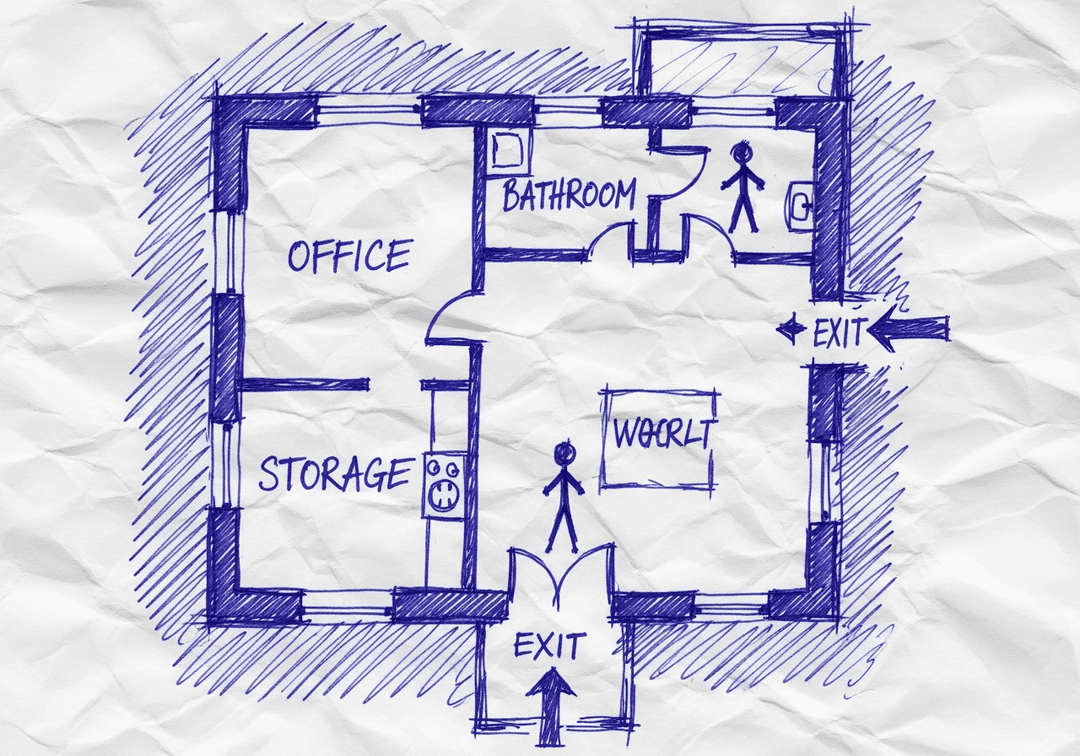
YOUR SOURCE
Hand-drawn workplace floor planPDF · photo · sketch
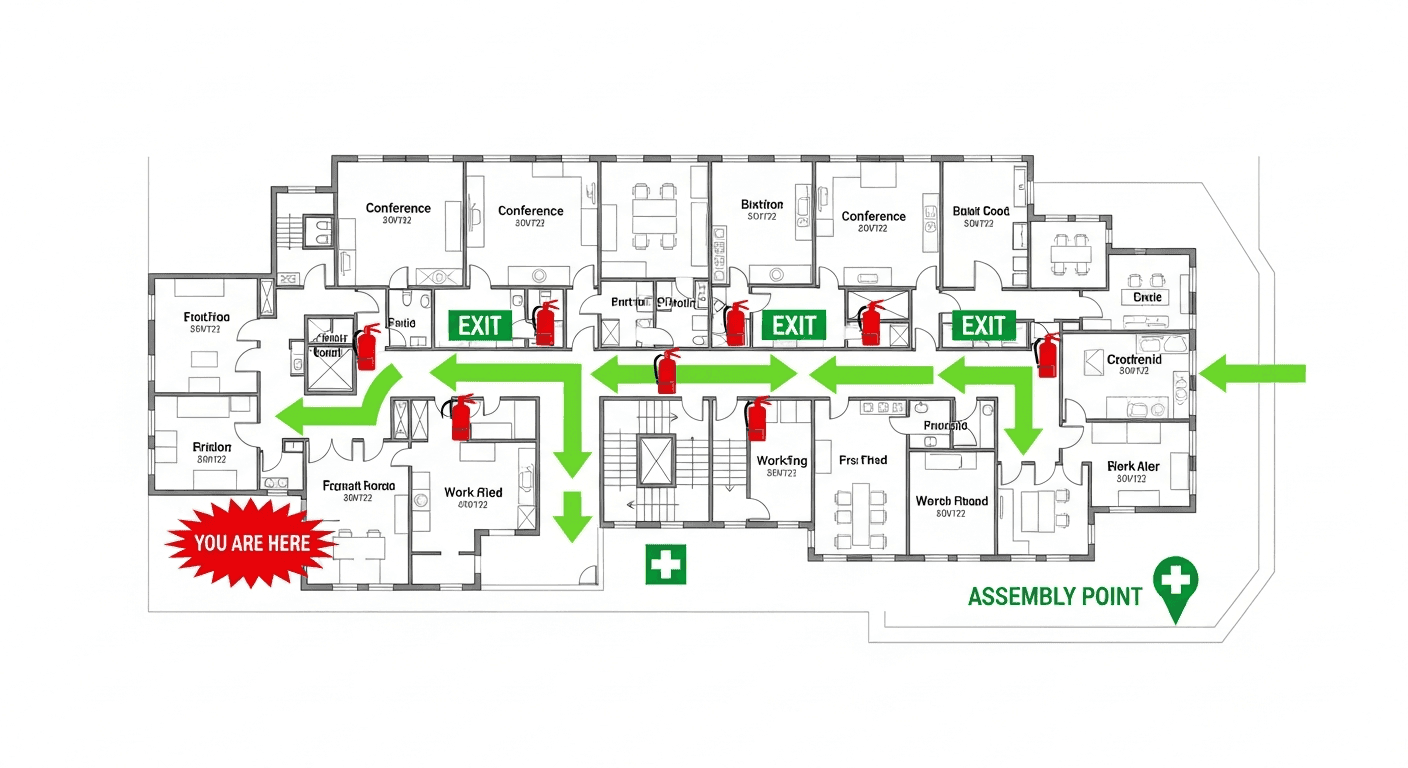
ILLUSTRATIVE EDITABLE DRAFT
The same hand-drawn workplace floor plan with an illustrative editable safety layer
Review before posting
Built for reviewConfirm site-specific routes and equipment.
Designed to editMove, resize, and adjust visual safety elements.
Ready to shareExport the reviewed draft as PDF, PNG, or SVG.

AI Creates the Draft. Your Safety Team Makes It Site-Ready.

Faster first drafts. Human-reviewed decisions. Safer U.S. workplaces.

INSIDE THE EDITING EXPERIENCE

AI creates the first draft.Your team stays in control.

The automation gets you to a strong starting point. The editor keeps your team in control of site-specific details.

WALKTHROUGHEvacuation map · editable draft
EDITABLE DRAFT
REVIEW CHECKVerify exit routeConfirm this path reflects the current facility.READY FOR REVIEW
EXPORT REVIEWED DRAFT
PDFPNGSVG

01 / 04 · Open draft

Your generated draft opens in the editor.

Start from the OSHA-aligned map draft and keep the building layout in view while you review each safety element.

OSHAMap creates an OSHA-aligned draft for review. Your safety team or AHJ should verify the final map before posting.

How Our AI Delivers Facility Modernization

Do I need design skills to create an evacuation map?

No design skills are required. Our AI understands hand-drawn floor plans, smartphone photos, scanned blueprints, and PDF documents. Simply upload any representation of your facility layout and receive a professional-grade emergency evacuation map instantly.

Are the generated maps OSHA-aligned?

OSHAMap is designed to help users organize key evacuation-planning information commonly associated with OSHA 29 CFR 1910.38 — clearly marked exit routes, fire extinguisher locations within 75-foot travel distance, assembly points, YOU ARE HERE markers, and accessibility accommodations per ADA guidelines. Each draft must be reviewed and verified for the actual workplace by the employer, safety officer, or AHJ before posting.

Can I update my evacuation map after renovations?

Yes. If you renovate your office or add an emergency exit, re-upload the updated floor plan and create a new draft for review. Free accounts include up to 5 regenerations per upload; verify each revision against the workplace before posting.

What types of buildings can use this evacuation map generator?

Our generator works for any building type including warehouses, manufacturing plants, healthcare facilities, schools, retail stores, and office buildings. The AI adapts to any facility size and layout, generating appropriate exit routes, fire safety equipment placement, and assembly point locations.

Key Statistics: Facility Modernization

Understanding the numbers behind facility modernization helps prioritize your safety planning.

1 in 59Inspection ProbabilityEmployers face random OSHA inspections
$16,550Average Violation FinePer serious OSHA violation
2.8 millionWorkplace InjuriesAnnual preventable injuries
SignificantFacility Modernization ImpactDirectly affects compliance and safety

Implementation Guide: Facility Modernization

Follow this step-by-step process to address facility modernization effectively.

1

Assess Current Status

Evaluate your current facility modernization situation and compliance status.

⏱️ 20 minutes
2

Document Your Layout

Photograph or scan your floor plan - any format works including hand-drawn sketches.

⏱️ 10 minutes
3

Generate Professional Map

Upload to OSHAMap for AI-powered compliant map generation.

⏱️ 2 minutes
4

Customize and Review

Add hazard zones, adjust routes, and verify all required elements.

⏱️ 15 minutes
5

Print and Post

Download print-ready PDFs and display at all required locations.

⏱️ 30 minutes
6

Train and Maintain

Orient employees and schedule regular reviews and updates.

⏱️ Ongoing

Traditional vs. OSHAMap

See how AI-powered evacuation maps outperform traditional methods for facility modernization.

AspectTraditional MethodsOSHAMap
Time to Complete3-6 weeks2 minutes
Cost per Map$500-$2,000Free preview
RevisionsExtra fees + delaysUnlimited, instant
OSHA ComplianceDepends on consultantOSHA-aligned
Facility Modernization FocusGeneric approachContext-specific solution
Industry KnowledgeAdditional consultationBuilt-in AI expertise

Facility Modernization Compliance Checklist

Use this checklist to ensure you've covered all aspects of facility modernization.

✓Modern professional appearance
✓Current best practices
✓Digital-ready formats
✓Easy to update
✓Overcome: Outdated materials
✓Overcome: Poor appearance
✓Overcome: Hard to update

Cost-Benefit Analysis

Compare the true costs of different approaches to facility modernization.

ItemTraditional ApproachWith OSHAMap
Professional Map Creation$500-2,000Free preview
Time to Delivery3-6 weeks waiting2 minutes
Revision Costs$100-300 per changeUnlimited free revisions
Annual Maintenance$300-500Generate new map anytime
Facility Modernization ComplianceAdditional consultingBuilt-in expertise

Expert Tips for Facility Modernization

💡

Modern, professional maps that are easy to update and maintain

— OSHAMap AI
💡

Modern professional appearance

— Safety Best Practices
💡

Current best practices

— Safety Best Practices
💡

Update evacuation maps within 30 days of any layout changes per OSHA requirements.

— 29 CFR 1910.38

Real-World Application

📋

Case Example: Facility Modernization

Scenario

A safety manager needed to address facility modernization for their organization.

Challenge

Traditional solutions were expensive, slow, and uncertain.

Solution

Used OSHAMap to generate professional, compliant evacuation maps instantly.

Outcome

Achieved full compliance in 2 minutes, saving weeks of time and thousands in consultant fees.

Data-Backed ROI

Measurable Impact & Return on Investment

Real benchmarks and verified cost savings from implementing this benefit

Map Update Cycle
Before3-6 weeks
→
AfterSame day
95%+ faster
Source: Facility management data - holistic safety improvement
Inspection Pass Rate
Before72% first-pass
→
After98% first-pass
26 point increase
Source: OSHA inspection outcomes - holistic safety improvement
Staff Training Time
Before2 hours/employee
→
After15 minutes/employee
87% reduction
Source: Onboarding metrics - holistic safety improvement

Industry Statistics

28% of all inspections
Businesses failing first OSHA inspection
Results in citations and follow-up - relevant to facility modernization
OSHA inspection data (2024)
Average 3-6 weeks
Time to update manual maps
Versus minutes with automation - relevant to facility modernization
Facility management surveys (2024)
45% fewer evacuation injuries
Employee injury reduction with proper maps
During emergency events - relevant to facility modernization
NFPA incident analysis (2023)
⚠️ OSHA COMPLIANCE ALERT

OSHA Compliance Alert: Facility Modernization

Over 52,548 OSHA violations issued nationally. Average penalty: $16,550 per serious violation.

🔍31,822Annual Inspections
⚠️52,548Violations
💰$189.4MTotal Penalties
💀5,486Fatalities
🚨

OSHA Penalty Structure - Know Your Risk

Other-than-SeriousUp to $16,550Per violation
Serious ViolationUp to $16,550Per violation
Willful / RepeatUp to $165,514Per violation
Failure to Abate$16,550/dayAfter citation deadline

Avoid costly penalties with compliant evacuation maps

⚠️

Top OSHA Violations in nationwide

Is your facility compliant?

🗺️

Missing Evacuation Maps = OSHA Violation

29 CFR 1910.38 requires emergency action plans with posted evacuation routes. Generate compliant maps in minutes.

⏰Don't Wait for an OSHA Inspection

Get Your your area Evacuation Map Today

Professional, OSHA-aligned maps generated in minutes. Avoid penalties up to $165,514 per violation.

View Pricing
✓ OSHA-Aligned✓ Print Ready✓ AI-Powered✓ Used by 47,000+ Businesses

See What You'll Get

Real examples of AI-generated OSHA-aligned evacuation maps

Corporate Office - California - OSHA-aligned evacuation floor plan with marked exits and fire safety equipment
🔍 View Full Size

Corporate Office - California

TechnologyCalifornia
Distribution Center - Texas - OSHA-aligned evacuation floor plan with marked exits and fire safety equipment
🔍 View Full Size

Distribution Center - Texas

WarehousingTexas
Medical Center - New York - OSHA-aligned evacuation floor plan with marked exits and fire safety equipment
🔍 View Full Size

Medical Center - New York

HealthcareNew York
Restaurant - Florida - OSHA-aligned evacuation floor plan with marked exits and fire safety equipment
🔍 View Full Size

Restaurant - Florida

RestaurantFlorida

Ready to create your own professional evacuation map?

Register for 5 free floor-plan uploads per month, with up to 5 regenerations per upload
🔓 Free Account Bonus

Unlock 5 Free Floor-Plan Uploads Per Month

Create your free account to access professional, OSHA-aligned evacuation-map drafts for review.

What You Get When You Register:

  • ✓ 5 Free Floor-Plan Uploads Per Month + Up to 5 Regenerations Per Upload - Professional maps ready for printing
  • ✓ No Watermarks - Clean, presentation-ready evacuation maps
  • ✓ Personal Dashboard - Manage all your maps in one place
  • ✓ Save & Revisit Anytime - Access your maps from any device
  • ✓ OSHA-Aligned - Meets 29 CFR 1910.38 requirements
15,000+Maps Generated
100%Compliant
Sample Output
Sample Facility Modernization OSHA-aligned evacuation floor plan showing emergency exits, fire extinguisher locations, and assembly points
🧯 Fire Extinguishers🚪 Exit Routes📍 You Are Here

No credit card required • Free account • Access your map drafts for review

Ready to Get Facility Modernization?

Join thousands of businesses benefiting from professional OSHA-aligned evacuation maps.